
Introduction
The Work Billing Report is a business report that provides detailed information about billing activities related to specific work performed by employees or teams. This report is useful for tracking and managing the financial aspects of projects, services, or tasks where billing is required. It helps ensure accurate invoicing, monitor project expenses, and provide insights into financial performance. To view this, navigate to Reports > Route Reports > Daily > Work Billing Report.
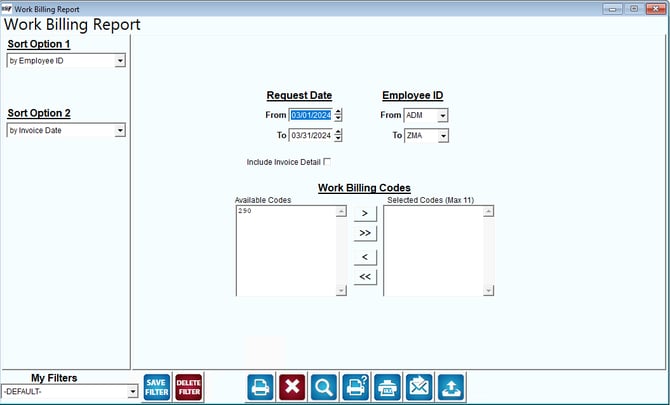
Fields:
Sort Option 1 and Sort Option 2: These dropdowns allow users to specify how the report data should be sorted. Options include "by Employee ID" and "by Invoice Date," which help organize the report based on employee identifiers or invoice dates.
Request Date: The "Request Date" fields allow users to filter the report based on the date range of requests for work billing. Users can specify start and end dates to focus on work requests made within a specific timeframe.
Employee ID: The "Employee ID" fields allow users to filter the report based on specific employees. Users can specify a range of employee IDs by entering "From" and "To" values, helping to narrow down the report to specific personnel involved in billing activities.
Include Invoice Detail: This option, when checked, includes detailed invoice information in the report, providing insights into individual billing items and charges.
Work Billing Codes: The "Work Billing Codes" section allows users to select specific billing codes that correspond to different types of work or services performed. Users can choose codes from the "Available Codes" list and move them to the "Selected Codes" list, which is limited to a maximum of 11 codes.
My Filters: Users can apply, save, or delete custom filters for generating the report. The dropdown shows the current filter being used, which is "-DEFAULT-."
Action Buttons: The buttons at the bottom likely perform functions such as saving filters, deleting filters, printing the report, exporting data, accessing help, and resetting the form.