
Overview
As a user working within the RMA desktop, there may come a time when you will notice one of the windows you are trying to edit has a pink border around it.
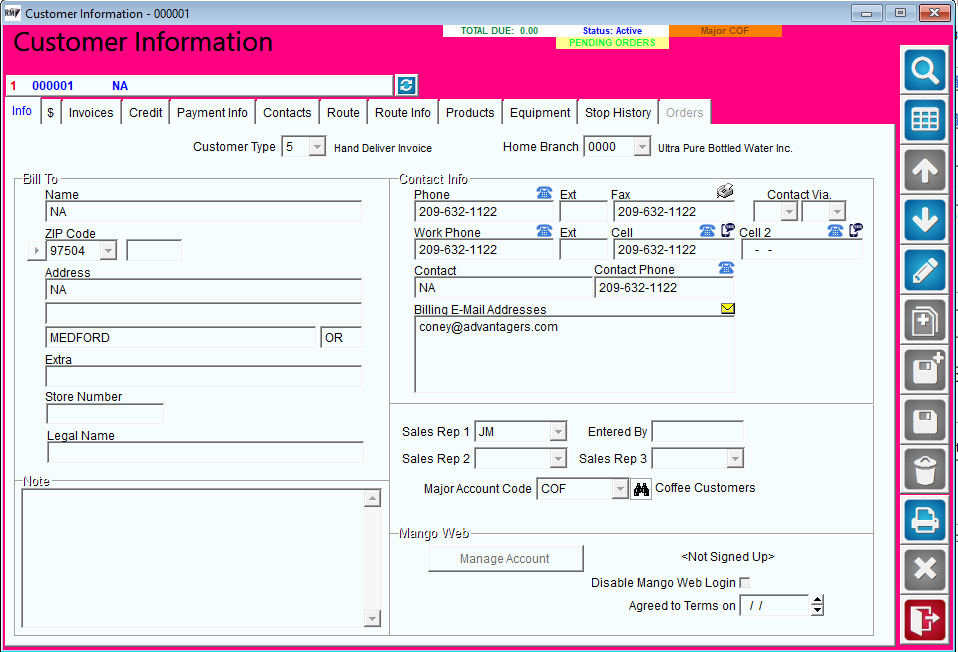
This border is indicating that another user is already editing that record.
If another user put the record in edit mode first, they will have access to make changes and the system will block the secondary user from editing by populating the pink border.
At times, it could also be the same user with a duplicate window open where one is already in Edit mode that will trigger the pink border as well.
How to Remove the Pink Border
-
To remove the pink border, first reach out to fellow coworkers to see if anyone is editing that specific record.
-
If no users are editing the record, double check your session to confirm you do not have a duplicated window open in edit mode.
-
If there are no duplicated windows open, and no other users are editing the record, you should have ALL users log out of RMA.
-
The proper way to log out is by going to File>Exit and Log Out.
-
NOTE: Clicking the red X in RMA to close out RMA could possibly hold open files on the back end and is not the proper way to log out of RMA.
-
Once everyone is logged out, re-log in and test the process once more.
-
If further assistance is needed, please contact Support@advantageroute.com.