
Introduction
This feature allows dispatchers to assign a truck class as “No Restriction” within the Mango Dispatch Manager. When optimizing a route, the system will ignore any previously set restrictions for that truck, enabling more streamlined route planning in situations where restrictions are not relevant or necessary.
Process
- Assign a Truck Class:
In RMA, navigate to Lists > Truck Information > Truck Class.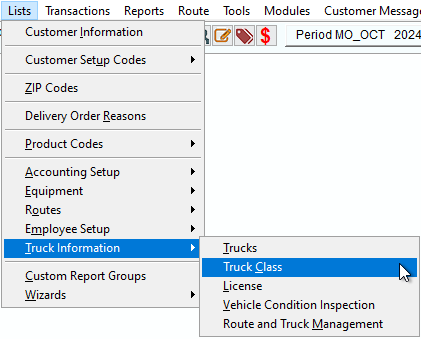
- On the Advanced Optimization screen, assign a truck the class of No Restriction. This designation will override any existing route constraints related to truck size, weight, or road limitations.
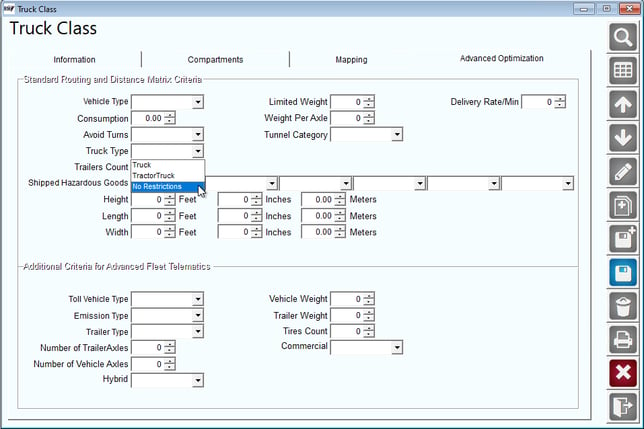
- Optimize a Route:
Use the Route Optimization tool to generate a route for the truck with the "No Restriction" class.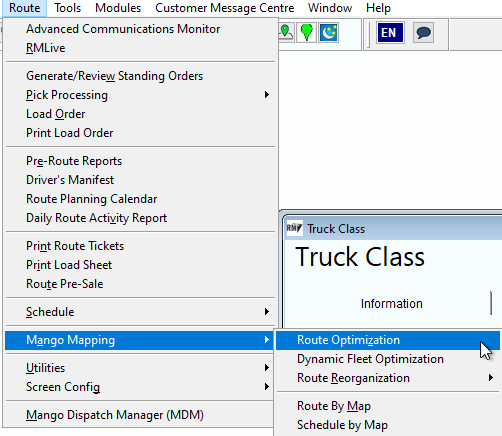 The system should now calculate the most efficient route without considering truck restrictions.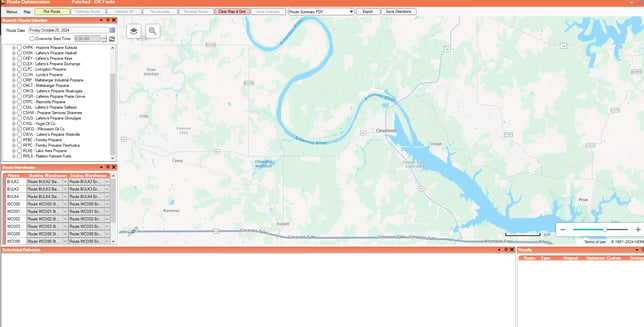
- Confirm Route:
Ensure that the truck is not being rerouted or constrained by any restrictions (such as weight limits, road access limitations, etc.) that would normally apply.
- Trucks with the No Restriction class should follow the most optimized route without detours or rerouting due to standard restrictions.
- Other trucks that have restrictions applied should continue to be routed according to those rules, ensuring the feature selectively disables restrictions as needed.
Summary
The Truck Type: Truck option uses the information you’ve provided about the truck (such as weight) when optimizing a route. For example, if there's a road with a weight restriction and your truck exceeds that limit, the system will avoid that road.
However, if you select Truck Type: No Restrictions, the route will not take the truck’s weight into account, and the system will allow routing on any road, regardless of restrictions.