
Introduction
The Suspended/Hold Service Accounts report can be utilized to find the accounts in the system that are marked as either Hold Service or as Suspended. The Suspended/Hold Service Accounts report can be found under Reports > Route Reports > Management > Suspended/Hold Service Accounts.
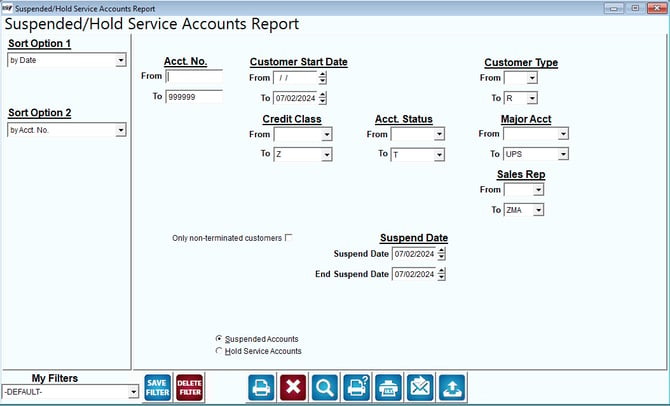
Fields:
Sort Option 1 & 2:The primary and secondary fields to sort by. You can choose from the following categories:
- Date
- Account No.
- Account Name
- Customer Type
- Major Acct. Code
- City
- Zip Code
- Tax Code
- Credit Class
- Statement Code
- Account Status
Acct No: The range of account numbers to include in the report.
Customer Start Date: Enter the range of customer Start Dates to include in the report.
Customer Type: The range of customer types to include in the report.
Credit Class: Enter the range of customer Credit Classes to include in the report.
Acct Status: Enter the range of Account Status Codes to include in the report.
Major Acct: The major account number range to include in the report.
Suspend Date: Enter the date range to include in the report for Suspended customers.
Only non-terminated customers: Select this option to suppress terminated customers from the report.
Suspended Accounts: Select this option to run the report for suspended customers.
Hold Service Accounts: Select this option to run the report for Hold Service customers.
Sales Rep: The range of Sales Reps to include in the report.