
Introduction
This report displays special order information collected on route for the dates entered. The Special Orders Report can be found under Reports > Route Reports > Daily > Specials Orders Report.
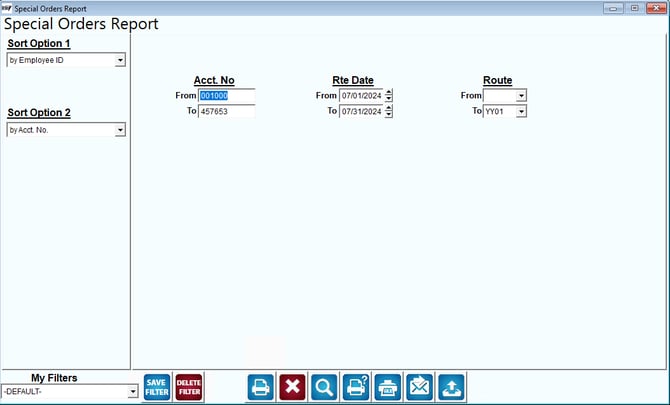
Fields:
Sort Options 1&2: These options are defaulted for you by Employee ID and Account Number.
Acct No: Enter the range of account numbers to include in the report.
Rte Date: Enter the route dates to include in the report.
Route: Enter the range of route ID’s to include in the report.
Work Billing Report
The Work Billing Report can be found under Reports > Route Reports > Daily > Work Billing Report.
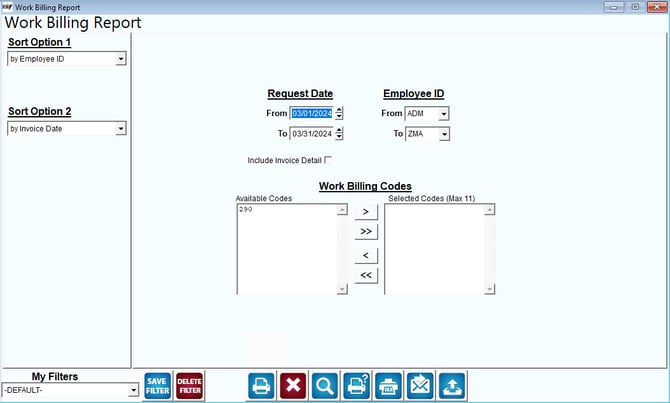
Fields:
Sort Options 1&2: These options are defaulted for you by Employee ID and Invoice Date.
Request Date: Enter the date range to include in the report.
Employee ID: Enter the employees to include in the report.
Work Billing Codes: Select the work billing codes to include in the report.