
Introduction
Process
Summary
Special Order Products in RMA allow for clear identification and tracking of items that are flagged as requiring special handling. Proper configuration and understanding of this feature ensure smooth operations and communication across departments.
Setup
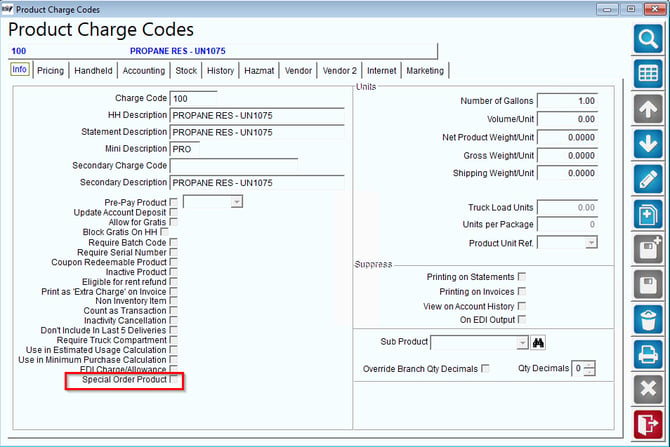
- Navigate to Lists > Product Codes > Product Charge Codes > Info Tab.
- Locate the Special Order Product flag.
- Ensure the flag is selected for any product requiring special handling.
Process
- Once the Special Order Product flag is selected in the RMA system:
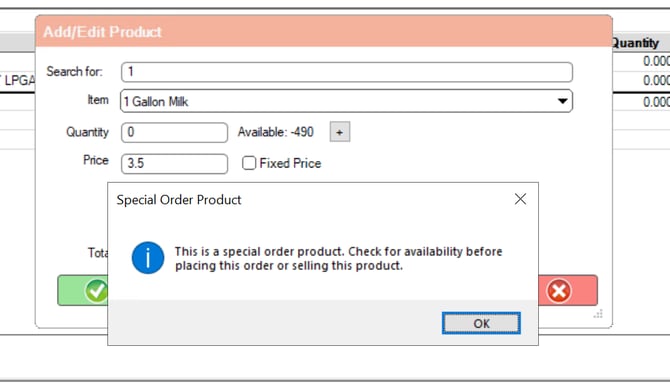
- A notification will appear on the MDM Order Entry screen.
- This notification indicates that the product is designated as a Special Order Product.
- Use the notification as a prompt to apply any additional processes or precautions required for Special Order Products.
Summary
By flagging products as Special Order in the RMA system, you enable effective communication and handling of unique product requirements. Ensure all applicable products are correctly flagged to streamline operations and reduce errors.