

Overview
As an Australian customer using our Customer Message Centre Module, you may find yourself wanting to send out SMS messages to your customers and allow them the ability to respond back via the message. This ability can help you to keep track of order changes, cancellations or even new order requests with ease.
In order to implement this process, you will need to complete the following steps notated in this article.
SetupThere are three steps to complete the setup.
- Purchasing CMC points for SMS messages.
- Submitting a commercial registrar document.
- Purchasing a Phone Number.
Use the guidelines below to follow through with each item.
Purchasing CMC Points
- Go to Modules > Customer Message Centre > Manage my CMC Points.
- Choose the package plan you would like to purchase.
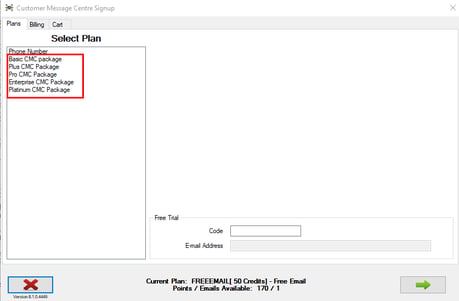
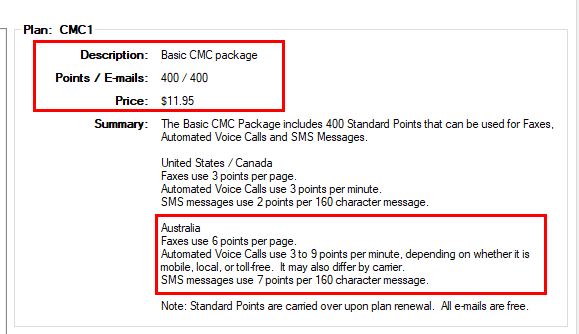
- You can click on each plan to see how many points it comes with as well as the cost.
- You will also notice in the "Summary" section, it will describe the amount of points it uses for the Australian system.
- Once the plan is chosen, select the green arrow at the bottom to proceed to the next window.
- On the billing Information, you will input your Card Information and Billing Address.
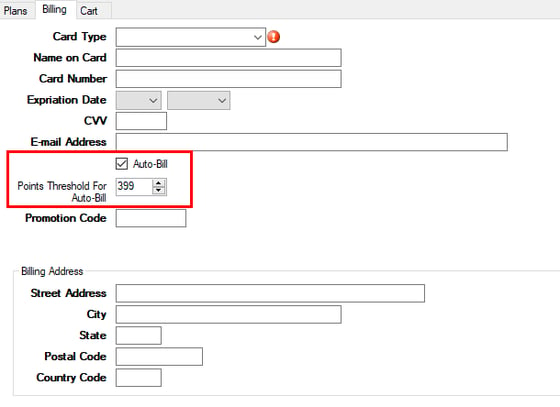
- You will notice there is also an "Auto-Bill" field.
- If you select this option, it will then allow you too input a "Points Threshold".
- The "Points Threshold" number will indicate when you will be auto billed again once you hit that threshold.
- i.e. If you set the threshold to 399 points and purchased the 400 point package plan, your card will be auto charged for the original plan purchased once you hit 399 points in the system.
- i.e. If you set the threshold to 399 points and purchased the 400 point package plan, your card will be auto charged for the original plan purchased once you hit 399 points in the system.
- NOTE: The Auto-Bill option is not required. If you do not wish for Auto-Billing, you can leave it deselected. You will then need to manually manage your available points instead.
- After inputting the CC information, proceed to the Cart tab where you can finalize your purchase.
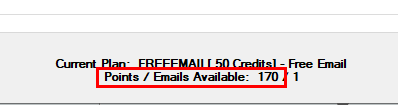
- Once finalized, the points will then show at the bottom of the screen for what you currently have available.
 NOTE: If you do not wish to use this window to purchase CMC points, you can also reach out to our Accounting department at accounting@advantagers.com.
Submitting a Commercial Registrar
Submitting a Commercial Registrar is the final setup process you will need to complete in order to properly receive responses sent to SMS messages. If this portion cannot be completed, you will only be able to send out SMS messages to customers and will not be able to receive their responses.
The Commercial Registrar is a form that will verify your business and is submitted to the Twilio company where the SMS messages/calls are handled when they are generated through RMA.
Use the following information to properly submit a Commercial Registrar to our Support team/Twilio.
- Click on the following link: ABN Lookup (business.gov.au)
- In the Search field, input your ABN #.

- In the following window, you will see information regarding your ABN Record.
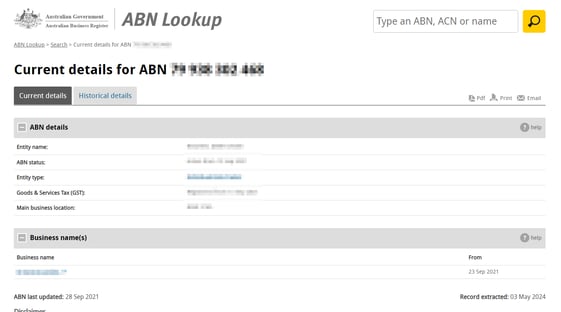
- In the top right corner, you can email, print or generate a PDF of your Business Registrar.

- This record will then need to be sent to our Support team in order to submit it to Twilio.
- You can also submit the record directly to Twilio as well if you prefer.
- Once the document is approved, ARS will then be notified and you can proceed forward with purchasing your phone number.
Purchasing a Phone number is required for the reply process to be complete. You must make sure you have enough CMC points (800 per month) available to use for the number.
In order to purchase a CMC phone number you will need to contact Support@advantagers.com and inform them that the first 2 steps have been completed. Once Support has been notified, a technician will reach out to further assist with the purchasing process with Twilio.
After the purchasing process is complete and implemented into the data base, you will then be able to receive SMS responses.
NOTE: When a customer responds directly to an SMS message via text, it will not come back to the phone number purchased. It will generate an email response and send it to the email on file for the workflow or to the employee that sent the message.
Important Information- If the information does not populate when searching for your ABN, you will need to do the following instead.
- Click on the following link:Custom Mobile Number for SMS in Australia | ARS Knowledge Base (knowledgeowl.com)
- Go through the information to Generate the 3 documents required for submission to Twilio.
- The Phone Number purchase process will need to be completed by ARS's Programming Manager that has access to the data base and Twilio.