Introduction
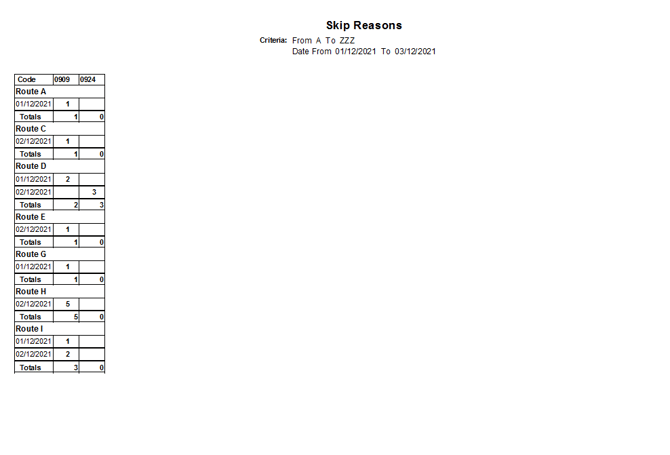
The Skip Reasons by Route report generates a list of customers who have had a skipped delivery, according to the specified criteria. The Skip Reasons by Route report can be found under Reports > Route Reports > Management > Skip Reasons by Route.
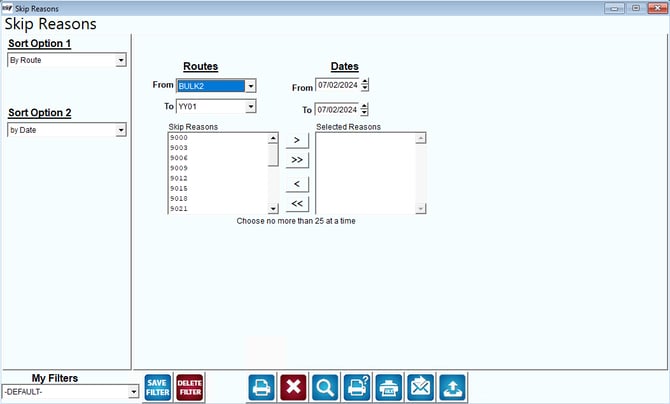
Fields:Sort Option 1 & 2: The primary and secondary fields to sort by. You can choose from the following options:
 Click this button to move the selected reason from Skip Reasons to Selected Skip Reasons.
 Click this button to move all reasons in Skip Reasons to Selected Skip Reasons.
 Click this button to move the selected field from Selected Skip Reasons to Skip Reasons.
 Click this button to move all reasons in Selected Skip Reasons to Skip Reasons.
- Route
- Date
Click this button to move the selected reason from Skip Reasons to Selected Skip Reasons. Click this button to move all reasons in Skip Reasons to Selected Skip Reasons. Click this button to move the selected field from Selected Skip Reasons to Skip Reasons. Click this button to move all reasons in Selected Skip Reasons to Skip Reasons.
Sample Report: