Introduction
A tool to help in managing your routes is the Sales Summary by Route report. This report shows sales for individual routes and service days. This printed report only displays a summary unless Include Detail is checked. The Sales Summary by Route report can be found under Reports > Route Reports > Sales > Sales Summary by Route.
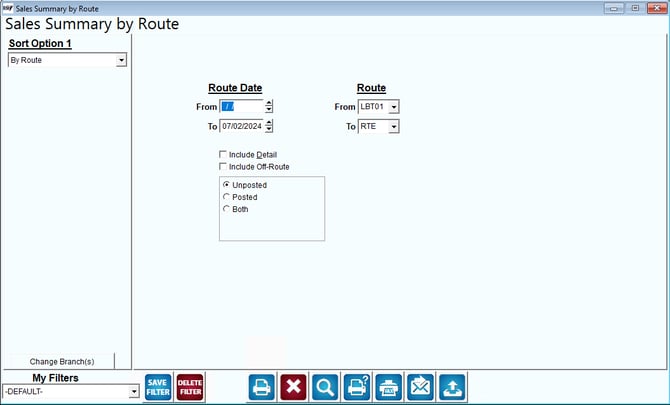
Fields:
Sort Option 1: This option is defaulted for you. This report can only be printed by Route.
Change Branch: If you are logged into multiple branches, this option may be shown and allows you to re-select the branches to include in the report instead of having to completely exit the report.
Route Date: The range of dates to include in the report.
Route: The range of routes to include in the report.
Include Detail: This option will include more details in the printed report.
Include Off-Route: Check this box to include off-route customers and regular customers on the report.
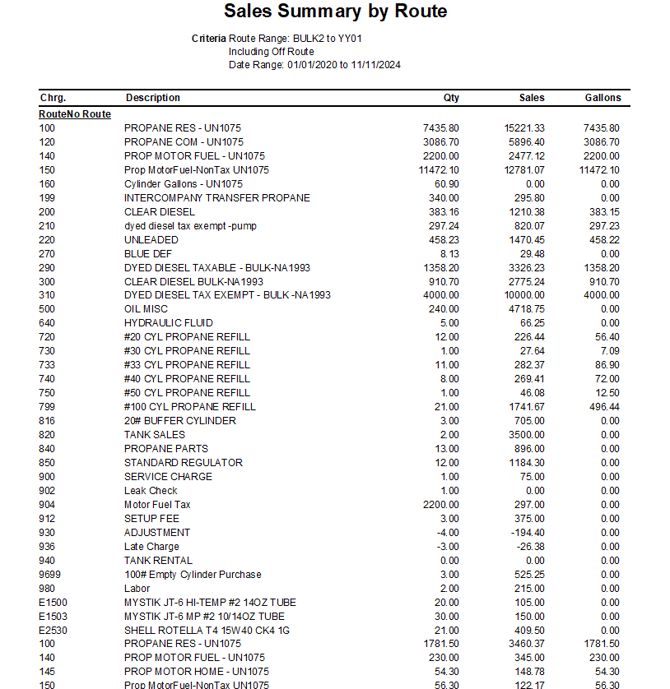
Here is an example of this report: