Skip to content
English
  • There are no suggestions because the search field is empty.

Sales Detail Report V8

Introduction


The Sales Detail Report provides detailed product sales figures based on a variety of criteria.  This report can be located under Reports > Accounting Reports > Sales > Sales Detail Report.

This popular report has great versatility. The output of the report will reflect the sort options selected, so you can create many outputs of this report by choosing different sort options. This report will only show posted amounts.

Here are some things you can do with this report:

Why is sales tax not included

The reason that we do not to put tax on the Sales Detail Report has to do with rounding and tax not being a product. This report has been designed to show product sales [and services if they have a product code].

For example:
If you have a single invoice and it has a product sold for Quantity 2 at $0.55, the tax on the product is $0. 0882, rounded to 2 decimals = $0.09 tax
However, if you have 2 separate invoices with Quantity 1 at $0.055, the tax on each would be $0.0441, rounded to 2 decimals = $0.04 tax, so those 2 invoices added together would only have $0.08 tax
Now if you were to add all of those invoices together, (Sales Detail or Spreadsheet), you end up with Quantity 4, and the tax will be calculated as $0.1765, rounded to 2 decimals = $0.18
As you can see, with only a single product spread across a few invoices, there is already a $0.01 tax calculation difference.
This customer’s account would show that they owe $2.37 (tax of $0.17), but the spreadsheet (or sales detail) would calculate out to $2.20 sales and $0.18 tax.

This will not necessarily happen for every product or quantity, but the potential is there.

Running the report

There are literally hundreds of ways you can run the report. it depends on your selection criteria. Like any report, there are three areas of the screen below that you will need to choose. These are:

These are:

  1. Sort Criteria
  2. Filters
  3. Report output

Sort Criteria

As you get started, you will notice that this report can have up to four sort critieria. This will give you the ability to sort and group to a deeper level.

Filters


Report Output

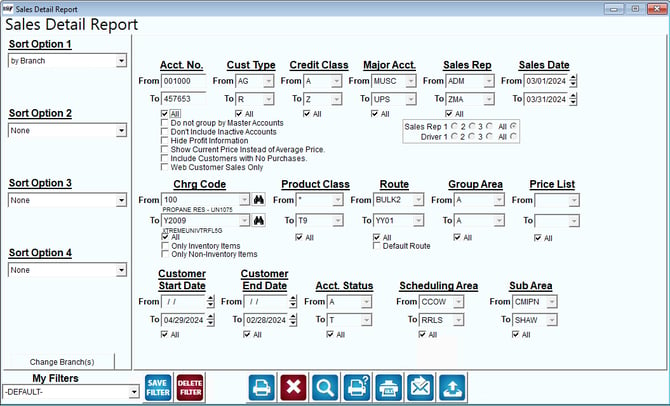
Getting started:
1721666856954 

Fields:

Sort Option 1, 2, 3, 4:  You can choose from the following categories:
  • Branch
  • Customer Type
  • Account Number
  • Date
  • Charge Code
  • Product Class
  • Sales Rep/Driver
  • Route
  • Major Acct. Code
  • Period (Will break down sales per period)
  • Price
  • Stop
  • Invoice Number
  • Quantity
  • Sales
  • Gallons
  • Group Area
  • Schedule area
  • Sub Area
  • Product Group
  • G/L Number
  • None
Change Branch: If you are logged into multiple branches, this option may be shown and allows you to re-select the branches to include in the report instead of having to completely exit the report.
Account No: Enter the range of account numbers to include in the report.
All: Default to include all customers.
Do not group by Master Accounts: Choose this option to include sub account information on the report if using master billing.
Don’t include Inactive Accounts: Choose this option to exclude account information for inactive customers.
Hide Profit Information: Check this box to suppress all of the “profit” related figures from the report (i.e., Cost of Goods and Gross Margin).  
Show Current Price Instead of Average Price: Check this box to show the current pricing instead of the average price.
Include Customers with No Purchases: Check this box to include customers without purchases on your report
Cust Type: Select the range of customer types to include in the report.
Credit Class: Enter the range of customer Credit Class Codes to include in the report.
All: Default to include all Customer Types in the report.
Major Acct Code: Select the major account number range to include in the report.
NOTE: It is not required to have a major account code on each account.  
Sales Rep: Select the range of Sales Reps to include in the report.
All: Default to include all Sales Reps in the report.
Sales Rep 1-3: Select the desired Sales Rep field to include in the report.
Driver 1-3: Select the desired Driver field to include in the report.
Sales Dates: Enter the range of dates to include in this report.
Chrg Code: Enter the range of charge codes to include in this report.
All: Default to include all Charge Codes in the report.
Only Inventory Items: Choose this option to exclude items marked as a Non Inventory Item in the Info tab of the Product Charge Code from the Sales Detail Report.
Only Non Inventory Items: Choose this option to see only items marked as Non Inventory Item in the Info tab of the Product Charge Code.
Product Class: The range of Product Class Codes to include in the report.
All: Default to include all product Class Codes in the report.
Route: Select the range of routes to include in the report.
All: Default to include all routes in the report.
All: Default to include all Major Account Codes in the report.
Group Area: Select the customers Group Area Code to include in the report.
All: Default to include all Group Area Codes in the report.
Price List: Select the Price Lists to include in the report.
All: Default to include all Price Lists in the report.
Customer Start Date: Select the Customer Start Date range to include on the report.
All: Default to include all Customer Start Dates in the report.
Customer End Date: Select the Customer End Date range to include on the report.
All: Default to include all Customer End Dates in the report.
Acct. Status: Select the customer Account Status Code range to include on the report.
All: Default to include all Account Status Codes in the report.
Scheduling Area: Select the range for scheduling area.
All: Default to include all Scheduling Areas in the report. 
Sub Area: Select the range for the sub area.
All: Default to include all Sub Areas in the report. 


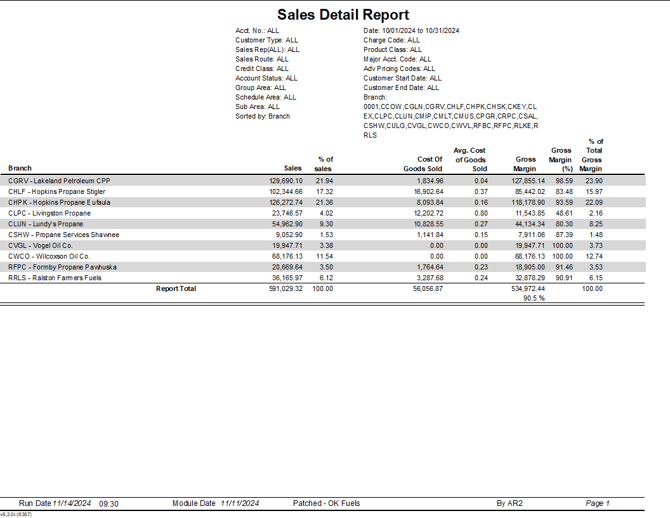
Here is an example of the report:


1731605453001