
Introduction
The Sales Commission Report is a business report designed to provide detailed insights into the commissions earned by salespeople based on their sales activities. This type of report helps organizations track sales performance, calculate commissions accurately, and ensure that sales incentives align with business goals. The report can also highlight sales trends, allowing management to adjust strategies as needed.
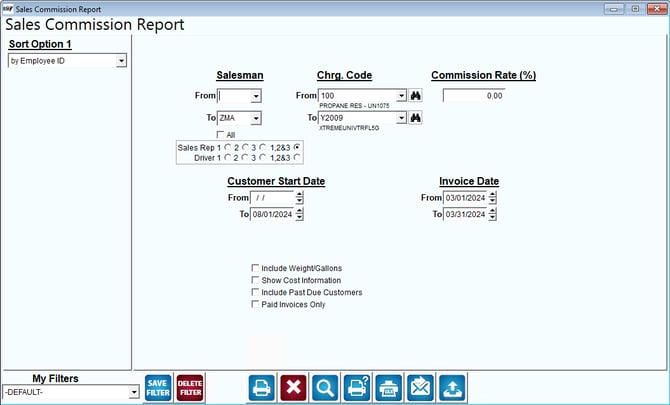
Fields:
Sort Option 1: This dropdown allows users to specify how the report data should be sorted. The current option is "by Employee ID," which organizes the report based on employee identifiers.
Salesman: The "Salesman" section allows users to filter the report based on specific salespeople. Users can specify a range by entering "From" and "To" values or select "All" to include all salespeople. There are also options to choose specific sales representatives or drivers.
Chrg. Code (Charge Code): The "Chrg. Code" fields allow users to filter the report based on specific charge codes. Users can select from predefined codes, which might represent different products or services sold.
Commission Rate (%): This field allows users to specify the commission rate to be applied to sales transactions. It can be used to calculate commissions based on a fixed percentage of sales.
Customer Start Date: This section enables users to filter the report based on the start date of the customer relationship. Users can specify a date range to focus on customers acquired within a specific timeframe.
Invoice Date: The "Invoice Date" fields allow users to filter the report based on the date range for invoices. Users can enter start and end dates to view commissions related to sales made during that period.
Additional Options:
Include Weight/Gallons: Includes information about the weight or volume of products sold, which might be relevant for industries dealing with bulk goods.
Show Cost Information: Provides details about the cost of goods sold, which can help in analyzing profit margins.
Include Past Due Customers: Includes customers with overdue payments, potentially affecting commission calculations.
Paid Invoices Only: Filters the report to include only transactions that have been paid.
My Filters: Users can apply, save, or delete custom filters for generating the report. The dropdown shows the current filter being used, which is "-DEFAULT-."
Action Buttons: The buttons at the bottom likely perform functions such as saving filters, deleting filters, printing the report, exporting data, accessing help, and resetting the form.