
Introduction
This report will display the breakdown (by account) of Invoices, Receipts, Credit/Debit Notes, Discounts and Write-offs for each employee. The Sales and Payments by Salesman report can be found under Reports > Management Reports > Sales and Payments by Salesman.
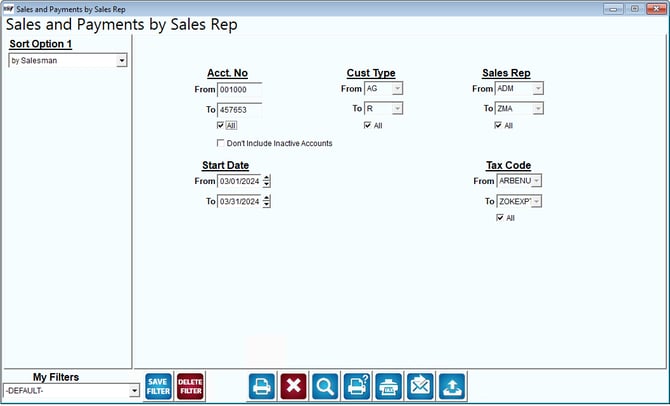
Fields:
Sort Option 1: The sort option is defaulted for you. This report can only be sorted by .
Account No: Enter the range of accounts to be included on the report.
All: Select this option to include all accounts on the report.
Don’t Include Inactive Accounts: Select this option to not include inactive accounts on the report.
Cust Type: Select the range of customer types to include on the report.
All: Select this option to include all customer types on the report.
Sales Rep: Select the range of sales reps to include on the report.
All: Select this option to include all sales reps on the report.
Start Date: Enter the range of customer start dates to include on the report.
Tax Code: Select the range of tax codes to include on the report.
All: Select this option to include all tax codes on the report.