Introduction
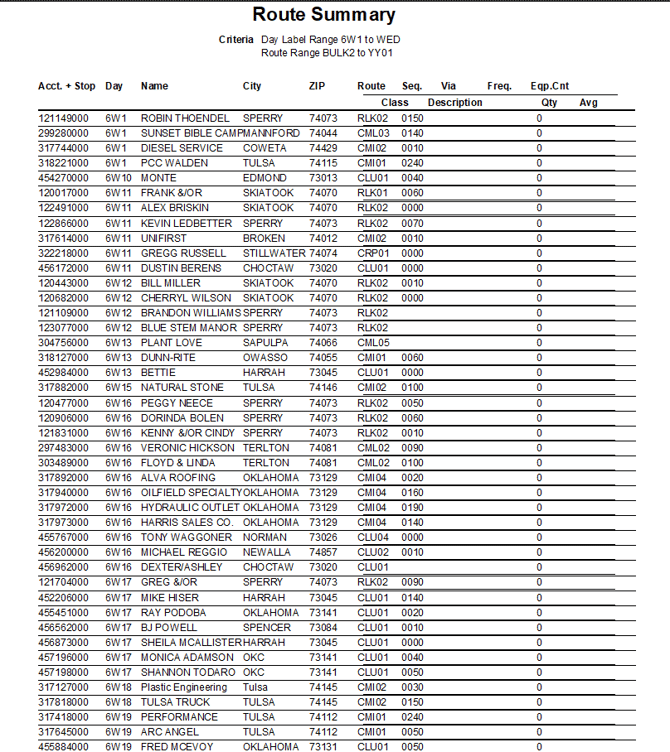
This report summarizes average products sold and equipment information based on Routes, Day Labels, and Products Sold. The Route Summary report can be found under Reports > Route Reports > Management > Route Summary.
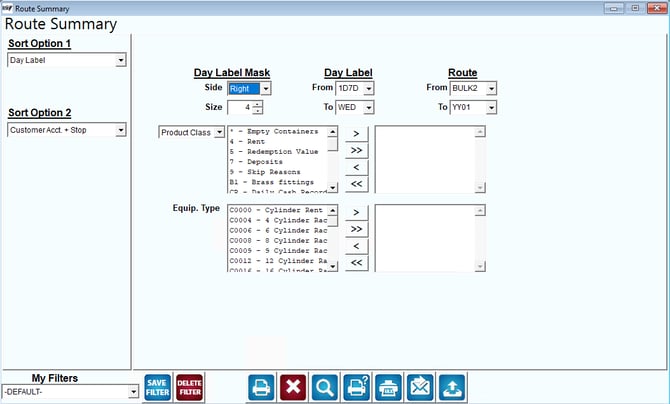
Fields:
Sort Option 1 & 2:The primary and secondary fields to sort by. You can choose from the following categories:
- Day Label
- Customer Account + Stop
- Sequence
- City
- Zip Code
- Via Code
- Frequency Code
- Number of Equipment
Day Label Mask: The number of characters to mask.
Day Label: Select the range of day labels to include in the report.
Route: Select the range of routes to be included on the report.
Product Class / Charge Code: Choose the product charge code(s) or class(s) to include in the report.
Equip. Type: Select the types of equipment to include in the report.
 Click this button to move the Product Class, Charge Code, or Equip. Type from available to selected.
 Click this button to move all Product Classes, Charge Codes, or Equip. Types from available to selected.
 Click this button to move the selected Product Class, Charge Code, or Equip. Type from selected to available.
 Click this button to move all Product Classes, Charge Codes, or Equip. Typse from selected to available.