
Introduction
This report will allow the user to view accounts by route, sequence number, and day label. The report can be reviewed periodically to ensure that customers are routed on the proper day labels. The Route Sequence Report can be found under Reports > Route Reports > Management > Route Sequence Report.
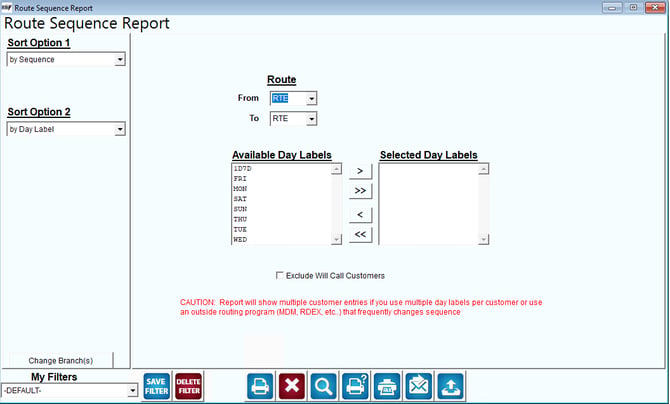
Fields:
Sort Option 1 & 2:The primary and secondary fields to sort by; you can choose from the following categories:
- By Sequence
- By Day Label
- By Acct. No
Change Branch: If you are logged into multiple branches, this option may be shown and allows you to re-select the branches to include in the report instead of having to completely exit the report.
Route: Enter a range of routes to include in the report.
Available Day Labels: A listing of all of the day labels in the program.
Selected Day Labels: A listing of the day labels added to the report.
Use the arrows or double-click on individual day labels to include them on the report.
 Click this button to move the selected reason from Available Day Labels to Selected Day Labels.
 Click this button to move all reasons in Available Day Labels to Selected Day Labels.
 Click this button to move the selected field from Selected Day Labels to Available Day Labels.
 Click this button to move all reasons in Selected Day Labels to Available Day Labels.
Exclude Will Call Customers: Select this option to exclude Will Call accounts from being included on the report.