
Introduction
The Route Planning Summary report will give you a list of customers that have had deliveries within the criteria selected. This will also show the total number of units purchased based on the products/classes chosen as well as sales figures, names, address and Lat/Long GPS coordinates. The Route Planning Summary report can be found under Reports > Route Reports > Management > Route Planning Summary.
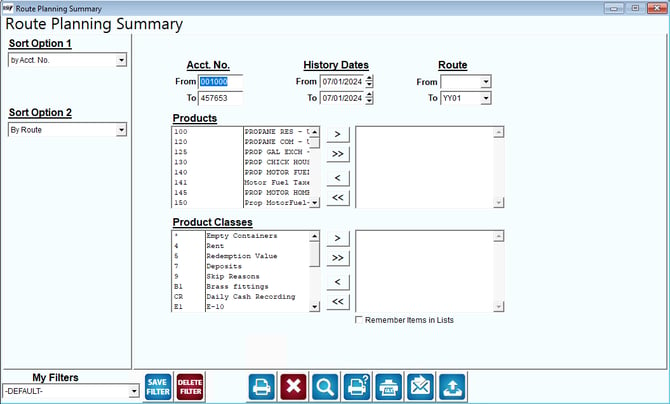
Fields:
Sort Option 1 & 2:The primary and secondary fields to sort by; you can choose from the following categories:
- By Acct. No
- Route
Acct No: Enter the range of account numbers to include on the report.
History Dates: Select a date range to use for the search criteria on the report.
Route: Enter the range of routes to include in the report.
Products: Select the products to be included on the report.
Product Classes: Select the product classes to be included on the report.
 Click this button to move the selected Products or Product Classes from available to selected.
 Click this button to move all items in Products or Product Classes from available to selected.
 Click this button to move the selected field from selected Products or Product Classes to available Products or Product Classes.
 Click this button to move all selected Products or Product Classes from selected to available.
Remember Items in Lists: Select this item to automatically re-select the Products and Product Classes the next time this report is opened.