
Introduction
The Route Miles Summary report provides you with detailed mileage information entered by each driver on the handheld. The Route Miles Summary report can be found under Reports > Route Reports > Other > Route Miles Summary.
NOTE: Mileage requirements can be configured for the handheld under Lists > Routes > Handheld Class, on the Load/Unload tab.
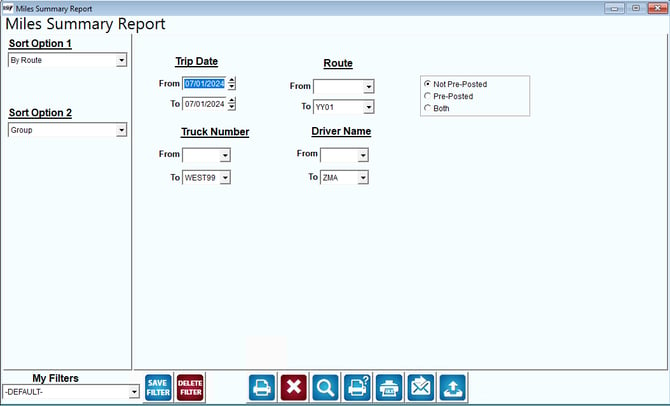
Fields:
Sort Option 1 & 2:The primary and secondary fields to sort by. You can choose from the following categories:
- Route
- Group
Trip Date: Enter the delivery date range to include in the report.
Route: Enter a range of routes to include in the report.
Truck Number: Enter a range of truck ID’s to include in the report.
Driver Name: Enter a range of drivers to include in the report.
Not Pre-Posted (Pending): Select this option to view pending route information.
NOTE: The following options only apply to multiple branch companies that use the Pre-Post Transactions option in RMA.
Pre-Posted: Select this option to view pre-posted route information.
Both: Select this option to view both pending and pre-posted route information.