Overview
If you charge customers a “Recurring Charge” for statement postage or any other reason, you will need to use this option.
Setup
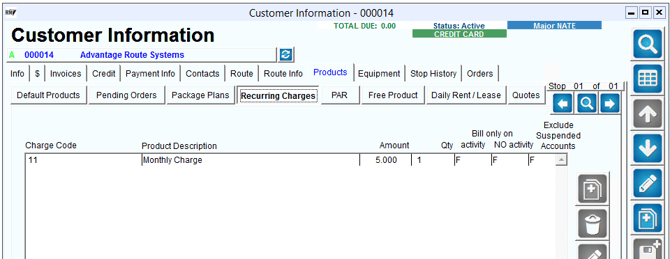
In order to generate recurring charges, you will need to designate a product charge code (or use an existing one) to apply to your accounts that will receive the charge(s). Once you have your product charge code, you will apply to the customers account under Lists > Customer Information > Products > Recurring Charges.
When adding or modifying a recurring charge, you have the options below:
- Charge Code: Select the Charge Code you wish to use when billing your recurring charges
- Amount: The dollar amount you want to bill for this specific charge
- Qty: The total quantity you want to show on the invoice
- Bill only on: Activity or No activity - this depends if the customer has an invoice for the current period, then the charge will run depending on which option you have selected. If you don't have either selected, the charge will run no matter what. NOTE: The "Count as Transaction" option needs to be checked on product charge code in order for "Bill on Activity" to work. This check option on the charge code is only available to customers on RMA Advanced/Enterprise. Pro users do not have access to use that function.
- Exclude suspended accounts; If the account is suspended from service, the invoice for the recurring charge will not be generated.
Note: If you have a recurring charge you would like to place on ALL customer accounts, you can use the global tool to Add/Remove Recurring Charges found under Tools > Global Changes.
Processing
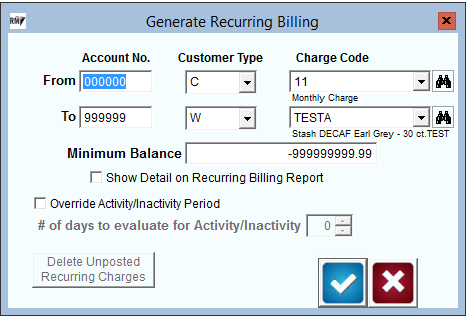
Once you have recurring charges setup on your accounts, you can then run the process to generate the invoices. Typically this is done during the month end process.
To do this, go to Transactions > Generate Recurring Billing Charges. Once you have your filters input in the screen below, select the checkmark to create the invoices. Once these are created, you can review them under Transactions > Invoices and Adjustments. If you need to delete them for any reason, come back into the screen below, and select the option to "Delete Unposted Recurring Charges", and you can start the process over.