
Introduction
This report calculates customer delivery needs based on their projected usage. The Projected Delivery Report can be found under Reports > Management Reports > Projected Delivery Report.
NOTE: This report is generally only used in the propane industry.
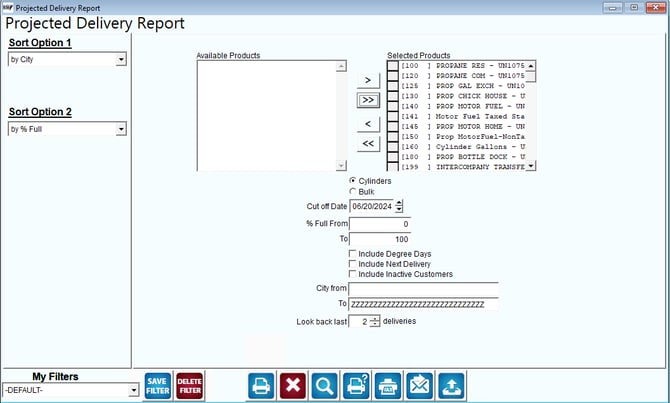
Fields:
Sort Option 1 & 2: The primary and secondary fields to sort by. You can choose from the following categories:
- City
- Percent Full
- Zip Code
Available Products: The list of products available.
Selected Products: Add the product range that should be included in the report.
Cylinders/Bulk: Choose one of the radio options to control the displayed column headings on the report:
- Cylinders = Bottles per Day / Capacity of Racks (for 20lb Cylinders).
- Bulk = Gallons per Day / Tank Capacity.
Cut Off Date: The projected end date the report should include, based on the customer’s delivery calendars (generally entered a week or more in advance).
% Full From/To: The projected amount full that the system should include in the report (e.g., 1 to 60%).
Include Degree Days: Click on this box to include Daily Temperature Recording report figures.
NOTE: For further information on Daily Temperature Recordings used primarily in the propane industry, refer to Chapter 3.22 of the Supplemental Guide.
City From/To: Enter the range of cities to include in the report.
Look back last __ deliveries: Enter up to five previous deliveries to include in the report — increasing the number of deliveries will result in a more even approximation.