Introduction
To help you plan how much product you will need for your route demands, use the following report. It not only looks back to a base period, but will also let you add or subtract a percentage from your base period to accommodate fluctuations in seasonal demand, temperature, or other factors. By entering ending inventory levels, you can also prepare for high demands. The Production Planning Forecast can be found under Reports > Management Reports > Production Planning Forecast.
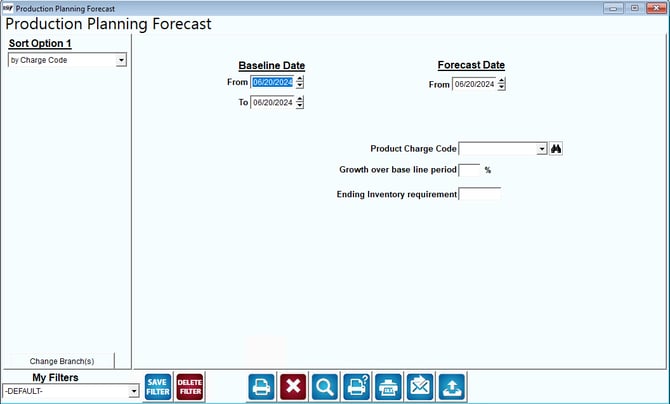
Fields:
Sort Option 1:This option is defaulted for you. This report can only be printed by Charge Code order, and you can only print the report for one product at a time.
Change Branch: If you are logged into multiple branches, this option may be shown and allows you to re-select the branches to include in the report instead of having to completely exit the report.
Baseline Date: Input a range of dates that you would like to use for the baseline. Typically, this is one month or one week. Too large a period is difficult to use and too short a period can be a poor indicator for the future.
Forecast Date: Input the date for the beginning of the forecast. The ending date will match the same period length that you chose for the baseline date.
Product Charge Code: Input the charge code you wish to forecast. Only one code is allowed.
Growth over base line period: Input the change from the baseline values that you would like to add or subtract for the growth in sales of the product in the forecasted period. This percentage can be either positive or negative to meet your needs.
Ending Inventory requirement: Input the required quantity of this product to be in your inventory at the end of the sales forecast.
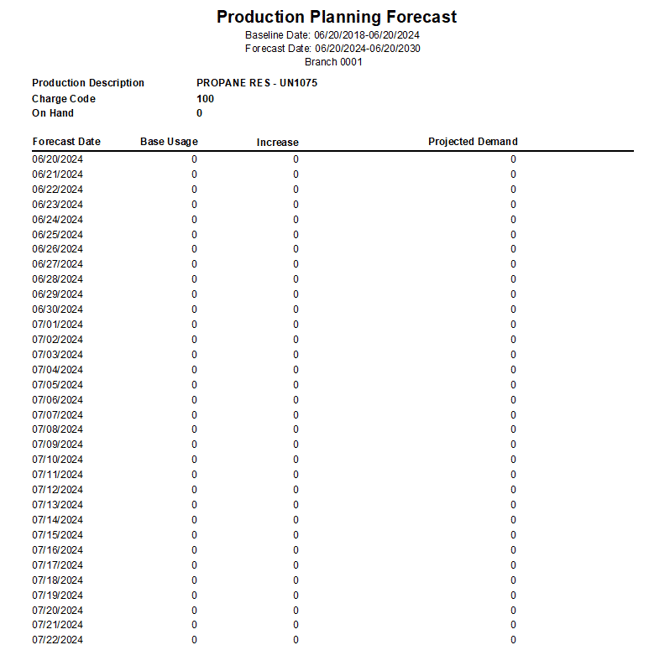
Here is an example of the report: