
Introduction
This report displays sold products and their assigned serial numbers. This is helpful for companies that use handheld scanners for inventory movement. The Product Serial Detail Report can be found under Reports > Route Reports > Other > Product Serial Detail Report.
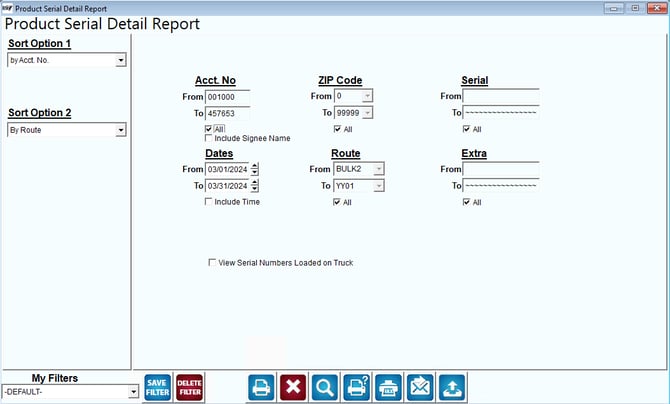
Fields:
Sort Option 1, & 2:The fields to sort by can choose from the following categories:
- Account Number
- Route
- Zip Code
- Serial
- Date
Acct No: Enter a range of customers to include in the report.
All: Check this box if a full range of data is requested.
Include Signee Name: Select this option to include the signee name entered during the transaction listed.
Zip Code:The range of ZIP Codes to include in the report.
All: Check this box if a full range of data is requested.
Serial: The range of serial numbers to include in the report. All pieces of equipment are included if no range is specified.
All: Check this box if a full range of data is requested.
Dates: Enter a range of delivery day(s) dates to include in the report.
Include Time: Select this option to include the time that the transaction took place on the specific date.
Route: Enter a range of routes to include in the report.
All: Check this box if a full range of data is requested.
Extra: Enter the ‘Extra’ field range to include in the report (assigned to the item on the Handheld tab within the Product Charge Codes screen).
All: Check this box if a full range of data is requested.
View Serial Numbers Loaded on Truck: Select this option to generate a report that will only list items that are currently assigned to a delivery vehicle.