
Introduction
This report provides detailed information on each customer's Prepay Products, including quantities and associated details. To view this report, navigate to Reports > Accounting Reports > Sales > Prepay Quantities Report.
NOTE: For further information on the Prepay Products option, refer to Chapter 2.09 of the Supplemental Guide.
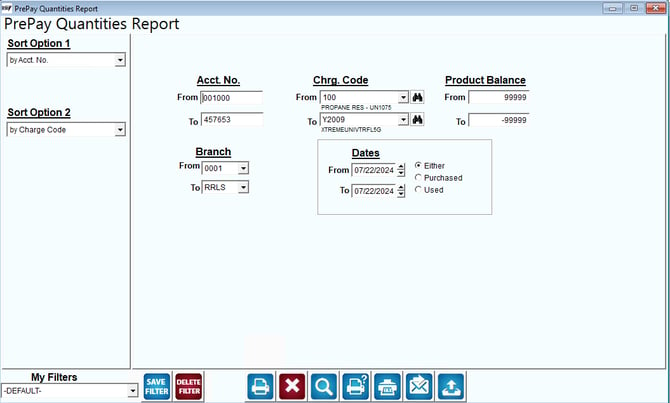
Fields:
Sort Option 1 & 2: The primary and secondary fields to sort by. Select one of the following categories:
- Account Number
- Charge Code
- Date
- Balance
- Branch
Acct No: Enter the range of account numbers to be included.
Chrg Code: Enter the range of product codes to include in the report.
Product Balance: Enter the range of ‘pre-paid’ balances to be included.
Branch: Select the range of company branches to include in the report.
Dates: Enter the range of prepay purchase dates to include in the report.
Either: Select this option to include both purchased and used information in the report.
Purchased: Select this option to only include customer prepay purchases in the report.
Used: Select this option to only include customers that have used (any portion of) their prepay products, in the report.