
Introduction
A Pending Contracts Report is a type of business report that provides a detailed view of contracts that have been initiated but not yet finalized or executed. This report helps businesses keep track of contracts that are in progress, ensuring that they can follow up on outstanding contracts and manage their contract pipeline effectively. Such reports are crucial for maintaining an organized approach to contract management, helping companies ensure that no contracts are overlooked or delayed unnecessarily.
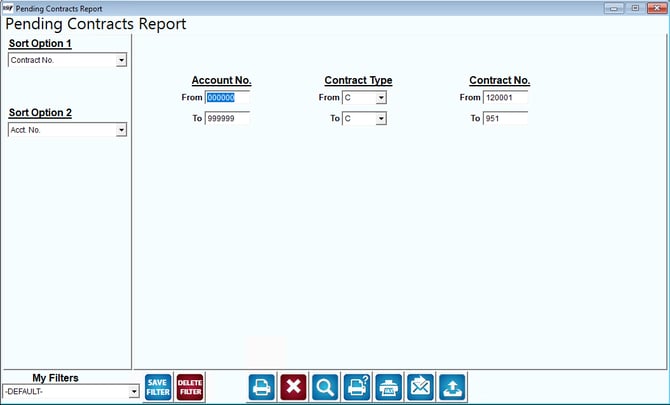
Fields:
Sort Option 1 and Sort Option 2: These dropdowns allow users to specify how the report data should be sorted. The options include "Contract No." and "Acct. No.," which help users organize the report based on contract numbers or account numbers.
Account No.: The "Account No." fields allow users to filter the report based on specific account numbers. Users can specify a range by entering "From" and "To" values to narrow down the report to specific accounts.
Contract Type: The "Contract Type" dropdowns allow users to filter the report based on contract types. This enables users to focus on particular types of contracts, such as sales contracts, lease agreements, or service contracts.
Contract No.: The "Contract No." fields are used to filter the report based on contract numbers. Users can enter a range of contract numbers to view specific contracts that are pending.
My Filters: This section allows users to apply, save, or delete custom filters for generating the report. The dropdown shows the current filter being used, which is "-DEFAULT-."
Action Buttons: The buttons at the bottom likely perform functions such as saving filters, deleting filters, printing the report, exporting data, accessing help, and resetting the form.