
Introduction
The Payment Lookup option allows you to search for a specific payment based on a check number, amount, batch number, and more. This can be found under Reports > Accounting Reports > Lookup > Payment Lookup.
NOTE: Press ESC while looking up payments to abort the lookup and display the results already found.
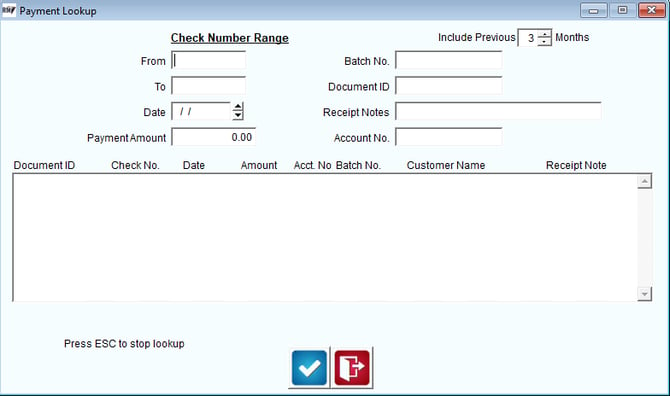
Fields:
From: Enter a starting check number to include in the range (if applicable).
To: Ending an ending check number to include in the search (if applicable).
Check Date: Enter the check date to include in the search (if applicable).
Payment Amount: Enter the payment amount to search for.
Include Previous: Enter the number of previous months to include in the search.
Batch No: Enter a batch number to include in the search (if applicable).
Document ID: Enter a document identification code to include in the search (if applicable).
Receipt Notes: Enter a payment note to include in the search (if applicable).
Account Number: Enter the account number to include in the search (if applicable).
Detail Line:
Document ID: Displays matching Document ID’s.
Check No.: Displays matching check numbers.
Date: Displays matching payment dates.
Amount: Displays matching payment amounts.
Account Number: Displays matching account numbers.
Batch Number: Displays matching Batch Numbers.
Customer Name: Displays matching customer names.
Receipt Note: Displays matching payment notes.