
Introduction
The Paid Invoices report, found under Reports > Accounting Reports > Lookup > Paid Invoices, lists all paid invoices on Open Item accounts.
NOTE: Open Items are only available on accounts that have the ‘Open Invoice’ option selected within the Billing/Statement of the Credit tab of Customer Information.
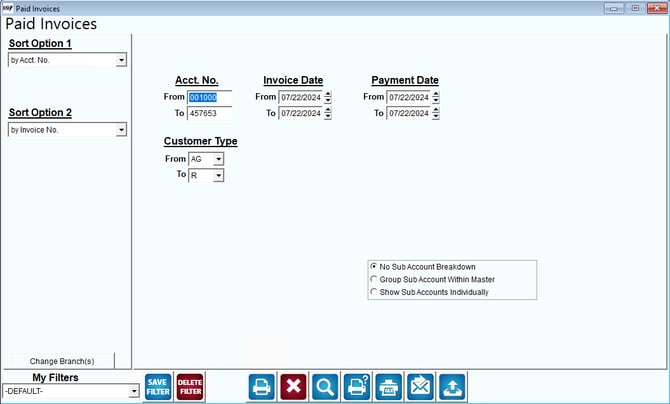
Fields:
Primary and Secondary Sort: The primary and secondary fields to sort by. You can choose from the following categories:
- Account Number
- Invoice Number
- Invoice Date
Change Branch: If you are logged into multiple branches, this option may be shown and allows you to re-select the branches to include in the report instead of having to completely exit the report.
Acct No: Enter the range of account numbers to include on the report.
Invoice Date: Enter the range of invoice dates to include on the report.
Payment Date: Enter the range of payment dates to include on the report.
Customer Type: Select the range of customer types to include on the report.
No Sub Account Breakdown: Select this option to suppress detailed Sub Account information and include all paid invoice details within their associated Master Account on the report.
Group Sub Account within Master: Select this option to list all of the paid Sub Account invoices under each Master Account on the report.
Show Sub Accounts Individually: Select this option to list all of the Sub Accounts individually on the report.