
Introduction
Use this report to identify customers with meager purchases (or even no purchases). This will let you evaluate the cost effectiveness of the offending customers. The Minimum Purchase Offenders report can be found under Reports > Route Reports > Management > Minimum Purchase Offenders.
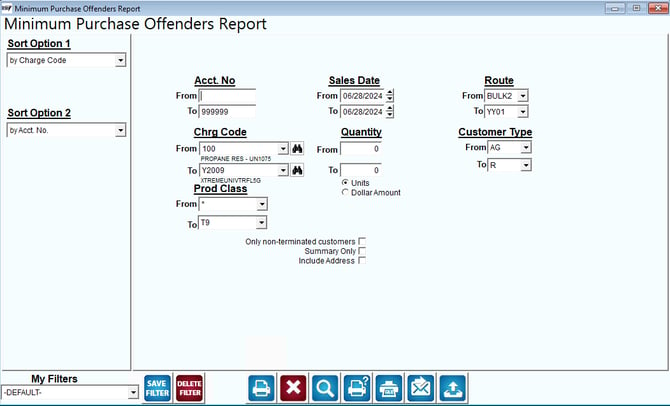
Fields:
Sort Option 1 & 2:The primary and secondary fields to sort by. You can choose from the following categories:
- Charge Code
- Account Number
Acct No.: Enter a range of customers to include in the report.
Start Date: Enter a range of customer start dates to include in the report.
Route: Enter a range of routes to include in the report.
Chrg Code: Enter a range of product codes to include in the report.
Quantity: Enter the range based on the option selected below:
Units: Select this radio button to view the report based on the quantity of items purchased.
Dollar Amount: Select this radio button to view the report based on the dollar amount of items purchased.
Customer Type: Enter the range of customer types to include on the report.
Prod Class: Enter the range of product classes to include on the report.
Only Non-terminated customers: Choose this option to display only non-terminated accounts.