Overview
When attempting to use Mango Mapping, and user receives errors about not being able to access content.
Symptoms
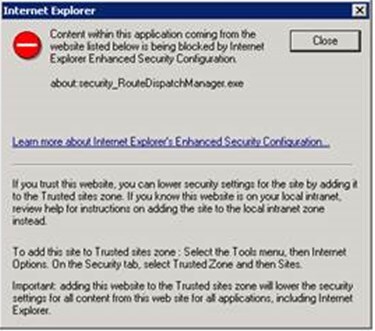
Error during the loading map phase that indicates "Content within this application coming from the website listed below is being blocked by Internet Explorer Enhanced Security Configuration. About:security_RouteDispatchManager.exe"
Cause
Internet Explorer Enhanced Security Configuration is Enabled.
Resolution
Add the following addresses to the "Trusted Sites" security zone within Internet Explorer Settings -
NOTE: These changes are Per User/Per Windows Profile and only suggested if you CAN'T turn of Explorer Enhanced Security.
- http://openweathermap.org
- http://api.openweathermap.org
- http://maps.googleapis.com
- http://ars247.com
- https://js.api.here.com
- about:security_RouteDispatchManager.exe
OR
Disable Internet Explorer Enhanced Security Configuration. Warning: This may increase risk of users browsing the internet and potentially visiting malicious websites.
Also, you will need to logon as the System Admin or Root user and edit ALL Registry entries for "IEHarden" and set them to "0". Then also add the trusted sites mentioned above.
After modifying the ESC Settings, you will need to restart your computer/server (where the ESC settings were changed). You may also temporarily run the following commands, to see if things work prior to restarting (Note: this is also Per User/Windows Profile specific).
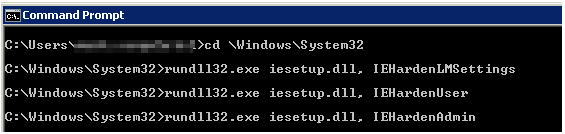
Open Command Prompt then enter the following commands:
- cd \Windows\System32 <enter key>
- rundll32.exe iesetup.dll, IEHardenLMSettings <enter key>
- rundll32.exe iesetup.dll, IEHardenUser <enter key>
- rundll32.exe iesetup.dll, IEHardenAdmin <enter key>
- Close Command Prompt Window.
Example of commands: