
Introduction
The Invoice Discount Report is designed to give a detailed view of invoice discounts based on the specified filters, helping users analyze sales and customer data effectively. To view this report, navigate to Reports > Accounting Reports > Sales > Invoice Discount Report.
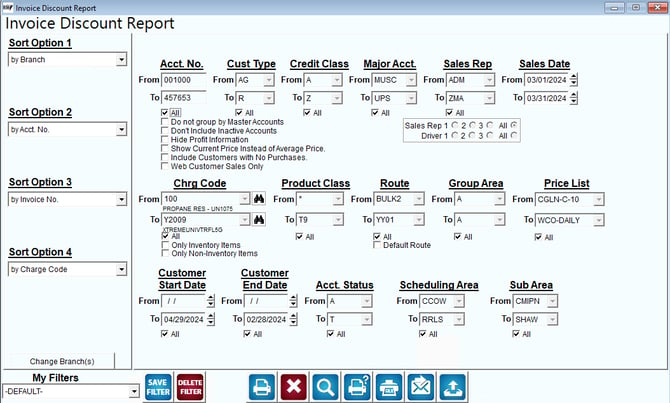
Fields:
Sorting Options:
1. Sort Option 1: By Branch
2. Sort Option 2: By Account Number
3. Sort Option 3: By Invoice Number
4. Sort Option 4: By Charge Code
Filtering Options:
Account Number (Acct. No.): Range from 001000 to 457653.
Customer Type (Cust Type): Range from AG to R.
Credit Class: Range from M to Z.
Major Account (Major Acct.): Range from MUSC to UPS.
Sales Representative (Sales Rep): Range from ADM to ZMA.
Sales Date: From 03/01/2024 to 03/31/2024.
Charge Code (Chrg Code): Specific codes like PROPANE RES - UN1075, XTREMUINVTRF L5G.
Product Class: From * to T9.
Route: Range from BULK2 to YY01.
Group Area: Range from A to A.
Price List: Range from CGLN-C-10 to WCO-DAILY.
Customer Start Date: Up to 04/29/2024.
Customer End Date: Up to 02/28/2024.
Account Status (Acct. Status): Range from A to Z.
Scheduling Area: Range from CCOW to RRLS.
Sub Area: Range from CMIPN to SHAW.
Additional Options:
Do not group by Master Accounts
Don't Include Inactive Accounts
Hide Profit Information
Show Current Price Instead of Average Price
Include Customers with No Purchases
Web Customer Sales Only
Sales Rep and Driver selection
Only Inventory Items or Non-Inventory Items
Actions:
- Save Filter
- Delete Filter
- Change Branch(s)
- Generate Report
- Export to various formats (PDF, Excel, etc.)
Summary
The report is designed to give a detailed view of invoice discounts based on the specified filters, helping users analyze sales and customer data effectively.