
Some users have reported that the handheld PIN code for their drivers is not working after being updated. This article will guide you through the steps to troubleshoot and resolve the issue of a handheld PIN code not functioning correctly in MOM.
Steps to Fix the IssueIf you're experiencing this issue, follow these steps to check if the PIN code update process was completed correctly:
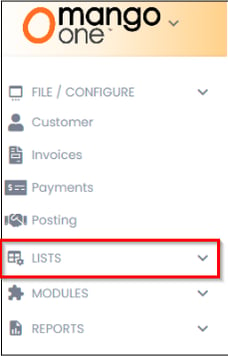
- Open Mango One and navigate to the Lists section.
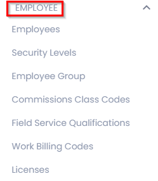
- Select Employees from the list.
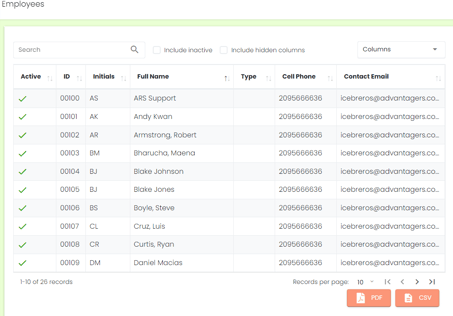
- Choose the driver whose PIN code needs to be updated.
- Go to the Information tab.
- Update the Handheld Password.
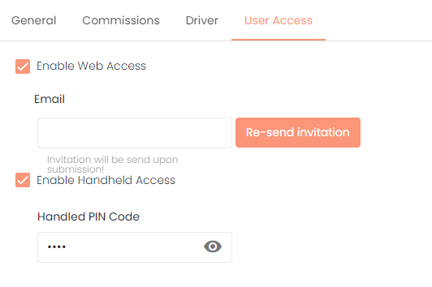
- Click Save.
In some cases, after following these steps, the new PIN code might not work when the driver attempts to use it on their handheld device.
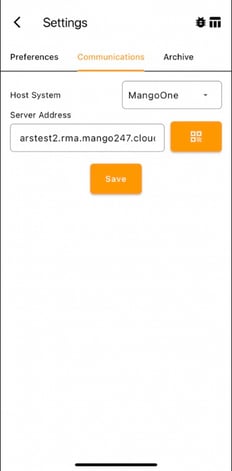
On Mango One MobileIn Mango One Mobile, if your Host System is set up through Mango One, this is where the issue may occur. Once the information is saved in Mango One, you need to configure the server in the Mango One Mobile app and save the settings. After doing this, you should be able to log in successfully.
This information is also located inside of the Mango One Desktop User Manual under Chapter 6- Lists.
Summary
By following these steps, you should be able to resolve any issues related to updating and using handheld PIN codes for drivers in MOM.