Introduction
This enhancement was made for HOWCOES for recording inventory adjustments from one tank to the next.
Setup
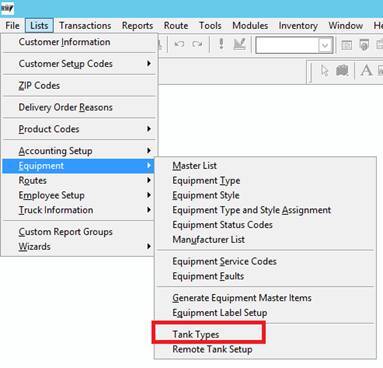
- Properly define tanks. Tank Types are defined under Equipment > Tank Types
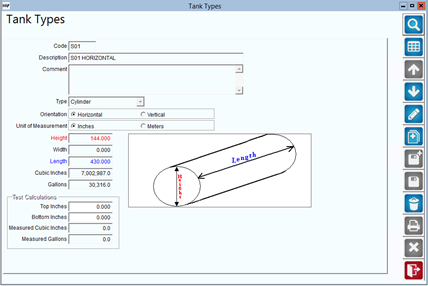
Tank Types are used to determine the size, shape and orientation of the tank. The measurements are then used to calculate volume based on Top (Start) and Bottom (Stop) inches.
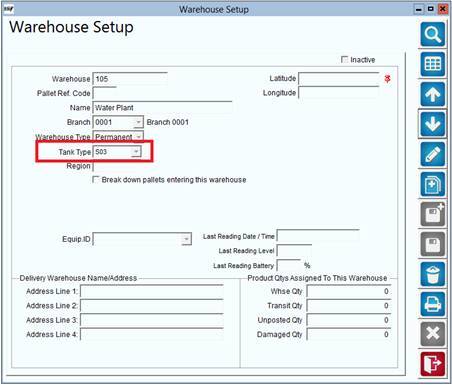
2. Assign a tank type to the warehouse under Modules > Inventory > Inventory Setup.
Process
- Go to Modules > Inventory > Inventory Adjustments
- Select the reason code
- Enter the source branch and tank
- Enter the destination branch and tank
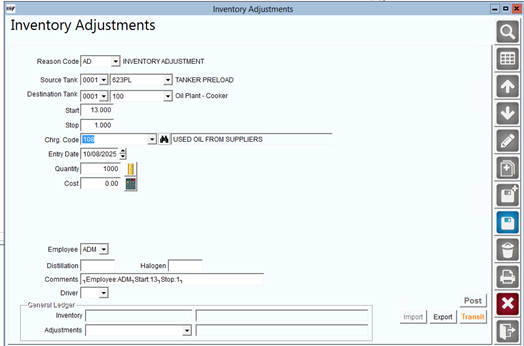
- The quantity transferred can be entered manually, by directly entering the quantity in the Quantity field, or can be done via a calculation based on the start & stop (top & bottom) measurements take on the source tank. When the record is saved, the quantity will be saved, and the start and stop inches will be noted in the Comments. The actual start and stop values are not stored with the inventory transaction, only the calculated quantity.
Note: Start and End should be the inches measured when a stick is used to measure the levels in the tank. Start should be greater than end.