
Overview
Use the steps below to configure your Local settings to view Active Customer Accounts only in the Customer Information Grid.
Important Information
Before enabling this setting, please be aware of the following:
- Active accounts are accounts that do not have an End Date assigned under Credit > Status/Contract > End Date.
- This setting does not prevent users from accessing inactive accounts within the Customer Information window.
- The setting only removes inactive accounts from the Customer Information Grid View.
- Users can still search for and open inactive accounts through the Customer Information window, even when this setting is enabled.
- All reporting, historical data, and account information related to inactive accounts will remain available.
- This configuration is applied on a per-workstation basis and must be enabled individually by each user who wishes to use it.
Setup Instructions
The Setup process pertains to each users workstation. Every user that wishes to restrict the Inactive Account view from the Customer Information Grid will need do the following setup.
- Log into RMA.
- Go to File>Local Settings>Info.
- Locate the "Browse only Active Accounts in Customer Information" option.
- Check this option to remove Inactive Accounts from the Customer Information Grid View.
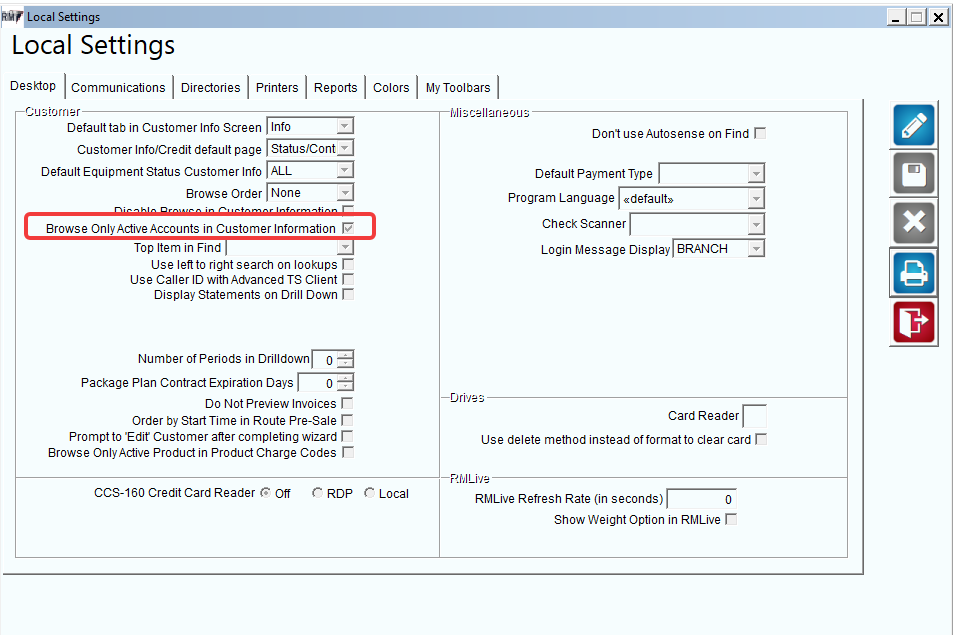
- Once done, save the changes and go to Lists>Customer Information.
- Click on the Grid to view all accounts.

- Review the "Inactive" column to confirm no accounts are set to "Yes".
Completion
Once the above steps have been completed, the Customer Information Grid will display only active customer accounts. Inactive accounts will no longer appear in the grid listing but will remain accessible through search and historical reporting functions.