Introduction
A new feature in V8 of RMA allows you to see clearly which of your tank levels come from Monitors and which ones are calculated by RMA.
Setup
For setup, you will simply do what you normally would to get the remote monitor installed and properly working. You will need to reference the installation steps for each type of monitor.
Process
A new feature in V8 of RMA allows you to see clearly which of your tank levels come from Remote Monitors and which ones are calculated by RMA.
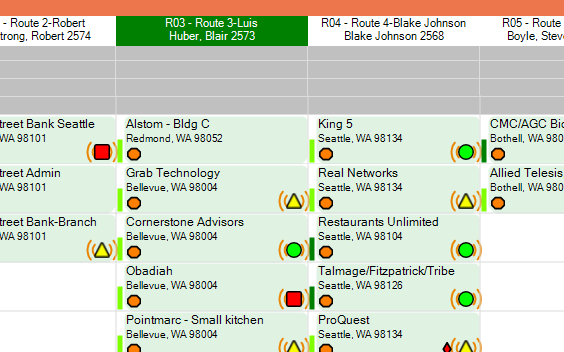
This will help you and your drivers to quickly tell which ones should be exact. In the chart below, when you see (( O )) this means it is exact or if you see O, it is just calculated. All of the items below are from Monitors.
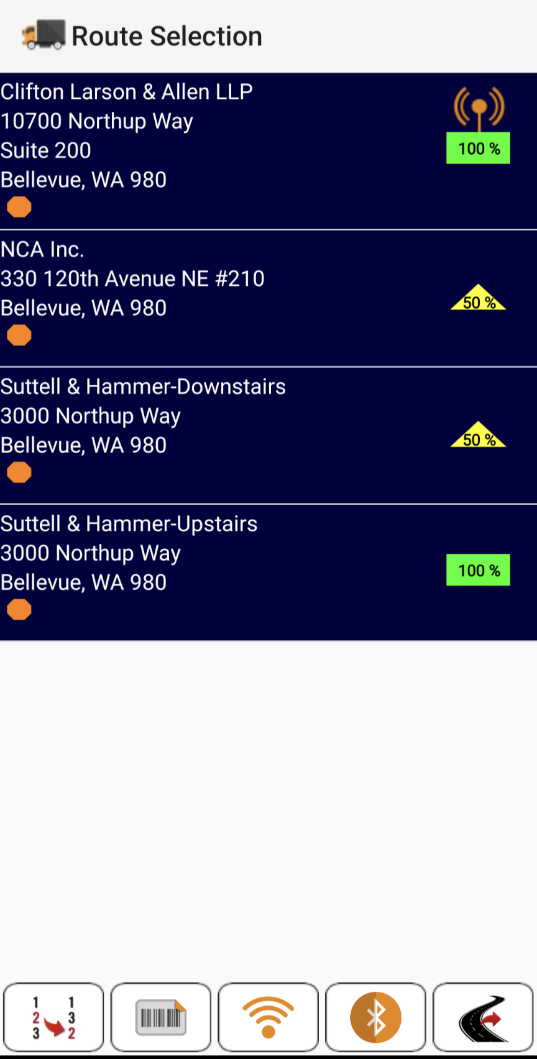
On the handheld you have a similar indication, but the antennae is shown in orange above the percentage. This will help your drivers!
You will see this in many windows including the Route Selection screen, Off-route selections, etc.