
Introduction
Budget Plans, also called Annual Payment Plans / Level Pay Plan – is a tool that allows propane customers to have a fixed payment amount all year round. This avoids having to pay for large, expensive propane bills in the wintertime. It does require a 12-month commitment, it is a standard feature in RMA that is included for propane customers.
This article shows you how to set up and use the tool so you can make life easier for your customers.
Setup
There are a few setup steps required in order to implement the Budget Plan. In addition, it will require an annual process to maintain the system.
Set up a credit card processing group by going to: Lists > Accounting > Electronic Funds Group Setup. 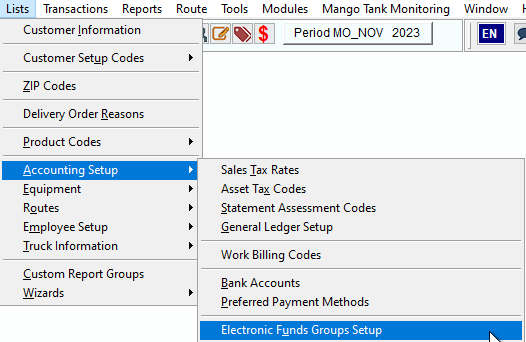 Call it group B as a code and "Budget Plan" for the description. Save it.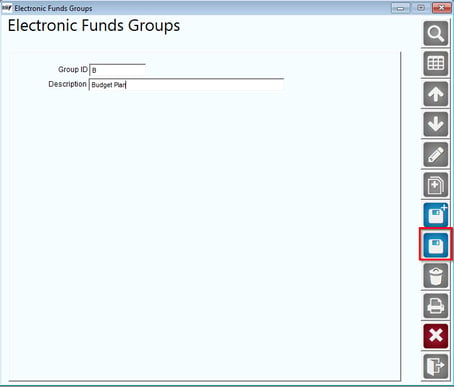
- Create a Contract type of "Budget." Go to Customer Setup Codes and then Contract Type Codes (near the bottom).
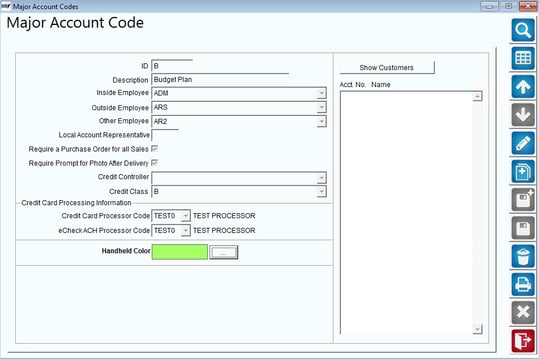
- Set up a Major Account code for "Budget Plan". Do this in Lists > Customer Setup Codes and Major Account Codes.
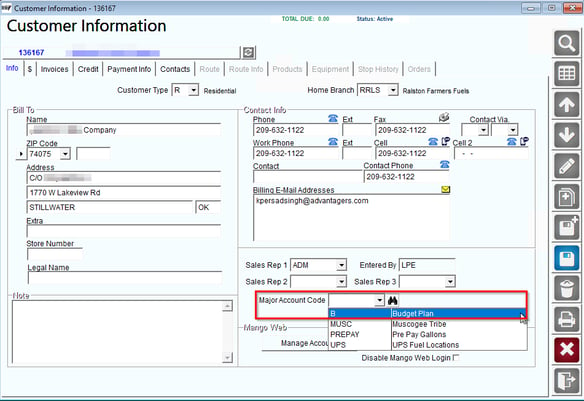
- Add Major Account code 'Budget' on Info Tab for each customer on the plan.
4. Under Credit > Contract – add new Contract. Fill in:
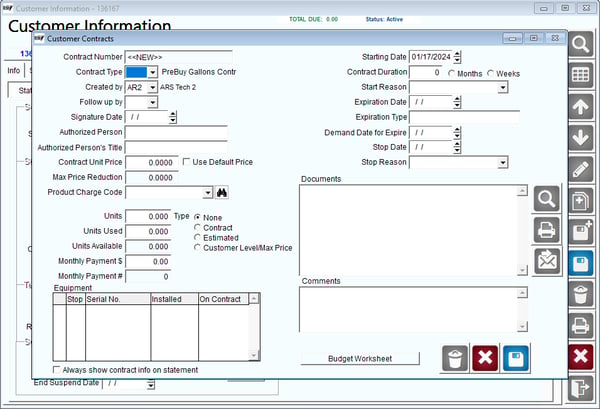
Fields:
Contract Number: A unique identifier assigned to a specific contract for tracking and reference purposes.
Contract Type: The categorization or classification that defines the nature and terms of a contractual agreement, such as fixed-price, time and materials, or cost-plus.
Created By: The individual or entity responsible for initiating and creating the contract.
Follow Up By: The person or department designated to follow up on the progress, execution, or any outstanding matters related to the contract.
Signature Date: Add the signature date.
Authorized Person: An individual granted the legal authority to act on behalf of a party involved in the contract, making decisions and entering into commitments.
Authorized Person's Title: The official job title or position held by the individual granted the legal authority to act on behalf of a party involved in the contract.
Contract Unit Price: The agreed-upon price per unit, item, or service as specified in the contract.
Max Price Reduction: The maximum allowable decrease in the contract price under specified conditions or circumstances.
Product Charge Code: A unique code assigned to a specific product or service within the contract for identification and tracking purposes.
Starting Date: The date on which a contractual agreement becomes effective and the parties involved are legally bound by its terms.
Duration: The specified period of time for which a contract is valid or in force, indicating the start and end dates of the contractual obligations.
Expiration Date: The date on which a contract or agreement officially ends, marking the conclusion of the specified duration.
Comments: Additional notes, explanations, or observations that provide context, clarification, or important information related to the contract.
Monthly Payment: The amount of money agreed upon in a contract to be paid on a monthly basis by one party to another.
Budget Gallons: The predetermined quantity of a resource, typically measured in gallons, allocated for use within the specified contract.
Remaining Gallons: The quantity of a resource, measured in gallons, that is still available for use and requires manual updating and management to keep track of usage.
5. Take Credit Card info and Vault into RMA.
- Add Budget Group + Monthly Payment Amount.
- Charge payment on 1st of the Month (Transactions > Payments > Credit Cards > Process).
*Need to have credit card processing with ARS set up in order to complete this*
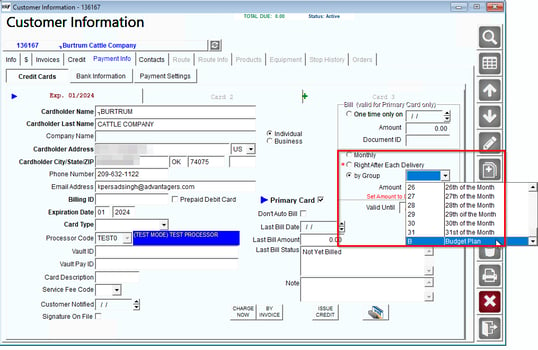
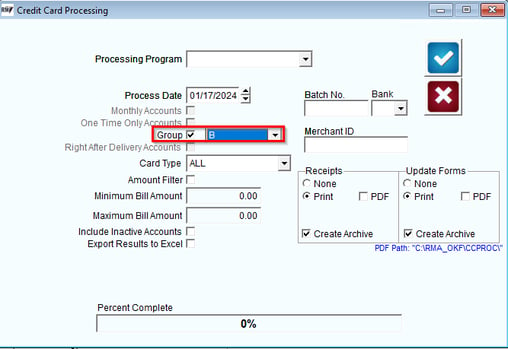
We are assuming that all budget customers have a credit card on file so you can process it each month. At a predetermined time of the month (Many people do this on the 4 - 8th of the month) you will charge the customer's credit card for the fixed amount.
To do this, go to Transactions > Payments > Credit Cards > Processing. Follow the format shown on the screen and be sure to select 'B' for the Group, as highlighted below.
Process
It works like this:
1. Customer wants a flat payment each month.
2. Usually in May or June, customer starts paying a fixed amount.
3. The fixed amount is calculated by:
- Determine the approximate annual propane cost. For example, this was $600 last year. (Look at old bills, ask for the customer's input)
- Take that amount and divide by 12. In our example, $600/12 months = $50 per month. This is the amount the customer will pay starting on June 1, for example.
4. The customer pays this amount every month.
5. The customer builds up a credit balance in the summer before heating season.
6. When a customer needs fuel, an invoice is created and charged as normal. This will reduce the credit balance. There typically is no special pricing involved. The customer does not pay for the invoice at the time of delivery.
7. In May or June, the office will look at these accounts to see who has a credit or debit balance and how much. (Using the Aging Analysis report and ask for Major Account Code B - Budget as the selection criteria.
8. This will be used to determine the payment amount for the next year. If there is a large balance or credit, it may be prudent for the customer to pay off the balance or receive a refund for the overpayment.
9. Before the new year starts (June 1) a new payment amount is calculated for the new year.
There are many variations of this plan. In this article, these will be discussed as well as how to set up this program.
Reporting
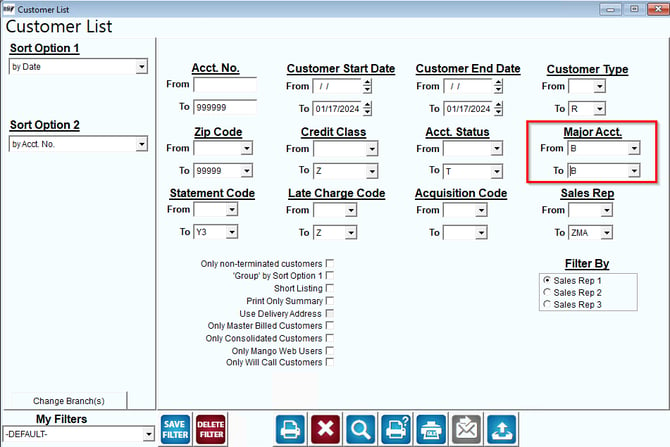
There are only a few reports that will help you with this tool. The first will help you identify who is indeed on a budget plan. You can do this with the Customer List Report. To run this, do the following: Navigate to Reports > List Reports > Customer List, and select 'Budget' under Major Account.
Customer Aging Analysis
The other important report is the Aging Analysis Report. This report allows you to check the balances of accounts designated as budget for various purposes.
- Confirm that the customer is paying into account regularly
- Make sure that there is a credit balance on the accounts to build up for the months when usage is higher
- Verify at the end of the year to make sure that customers do not owe you money. This is typically done during the annual reconciliation event.
You may find other reports useful from time-to-time.