
Introduction
A common practice with propane companies is to create a service commitment to “Keep Full” for their customers. This means the propane company will always make sure there is adequate gas in the tank so the customer never runs out. In RMA, you can mark account as a Keep Full if you set up your Stop Types correctly.
This will not only show on the customer route information, but can be seen on your handheld as well.
Setup
The setup is a simple process. The most important step is to check the flag "Keep Full" on Stop Types. To get to Stop Types, you need to go to Lists > Routes > Stop Type Codes. You will then see this screen:
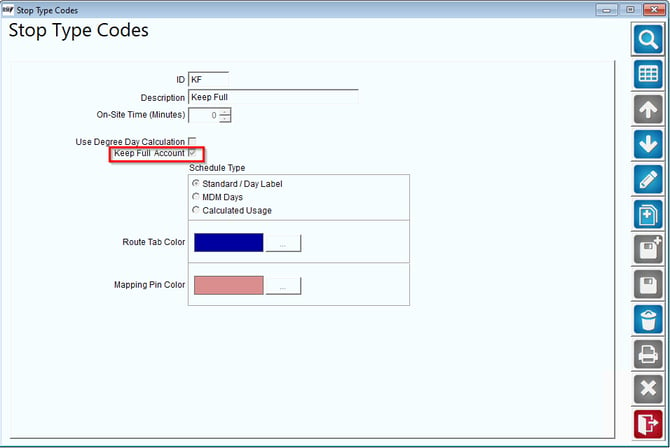
Be sure to check the box: Keep Full Account. You will need to do this for all Stop Types that you want so marked.
Then, on the Customer Screen, Route tab, you will need to have your customer assigned to this Stop Type.
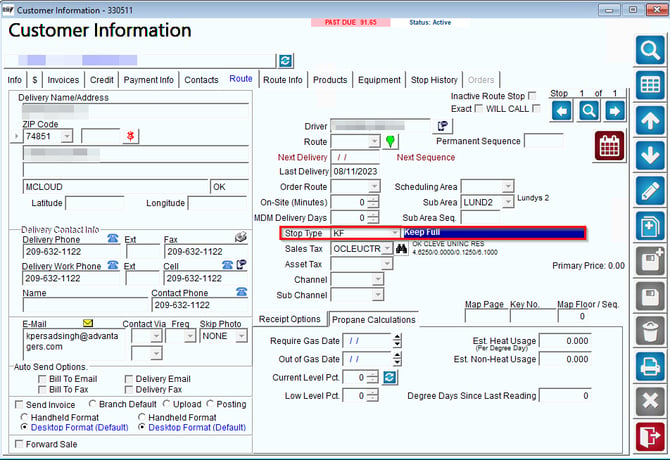
Notice above the Stop Type is KF or Keep Full.
This is all of the setup you will need. If you have been using RMA for a while, you might want to contact our Support Team to assist you in doing a bulk assignment of Stop Type for your customers based on some logic you had previously been using to track Keep Fulls.
Using Keep Full
There are a couple of areas that you can see Keep Fulls as you use RMA, MDM and the handheld.
Reporting
There is one desktop report that uses Keep Full data.