
Introduction
The Gross Profit Comparison Report, located at Reports > Accounting Reports > Sales > Gross Profit Comparison Report, displays gross profit comparisons to previous years.
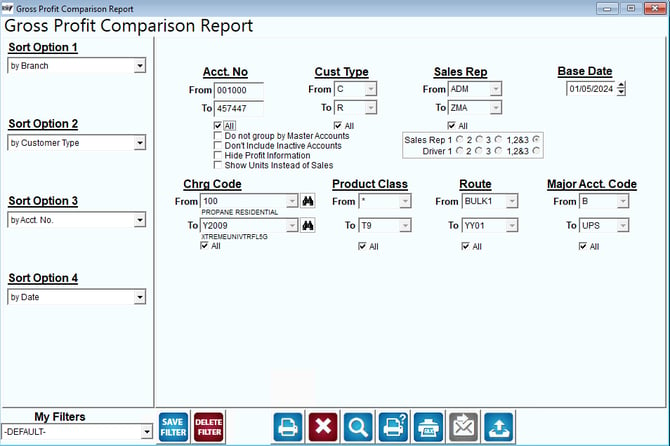
Fields:
Sort Option 1, 2, 3: You can choose from the following categories:
- Branch
- Customer Type
- Account Number
- Date
- Charge Code
- Product Class
- Employee ID
- Route
- Major Acct. Code
- Period (Will break down sales per period)
- Price
- Stop
- Invoice Number
- Quantity
- Sales
- Gallons
- Group Area
- None
Acct No: Enter the range of account numbers to include on the report.
All: Select this option to include ALL customer account numbers on the report.
Do not group by Master Accounts: Select this option to not group Master/Sub accounts together.
Don’t include Inactive Accounts: Select this option to not display inactive accounts on the report.
Hide Profit Information: Select this option to hide the Profit data from the report.
Show Units Instead of Sales: Check this box if you would like to show the number of units sold instead of sales.
Cust Type: Select the range of customer types to include on the report.
All: Select this option to include ALL customer types on the report.
Sales Rep: Select the range of sales reps to include on the report.
All: Select this option to include ALL sales reps on the report.
Sales Rep 1-3: Select which sales rep field (or all) to search by.
Driver 1-3: Select which Driver field (or all) to search by.
Base Date: Select a date to be used as the base data. This will include this month in the month comparisons and the Year to Date (up to selected date) comparisons.
Chrg Code: Enter the range of charge codes to include on the report.
All: Select this option to include ALL charge codes on the report.
Product Class: Select the range of product classes to include.
All: Select this option to include ALL product classes on the report.
Route: Select the range or routes to include on the report.
All: Select this option to include ALL routes on the report.
Major Acct Code: Select the range of major account codes to include on the report.
All: Select this option to include ALL major account codes on the report.