
Introduction
RMA™ will serve as the primary tool for managing customer-related Accounts Receivable in your business. This includes creating and maintaining customer account records, generating and tracking invoices, applying payments, monitoring open balances, and following up on overdue accounts. The system is designed to ensure that every transaction flows through to the appropriate General Ledger (GL) accounts, giving you accurate and real-time financial data. By tying customer activity directly into your accounting structure, RMA™ provides a clear audit trail, simplifies month-end reconciliation, and helps maintain compliance with accounting standards.
In addition, the summary integration with GL accounts ensures that all receivable-related activity—such as sales, cash receipts, adjustments, write-offs, and finance charges—is properly categorized and reported. This streamlines financial reporting, improves cash flow visibility, and supports better decision-making by providing management with up-to-date insights into both customer payment behavior and overall financial performance.
NOTE: The accounts added should fall under one of six general ledger types available: Cash, Asset, Accounts Receivable, Liability, Revenue, and Expense.
Setup Process: Go to Lists > Accounting Setup > General Ledger Setup.
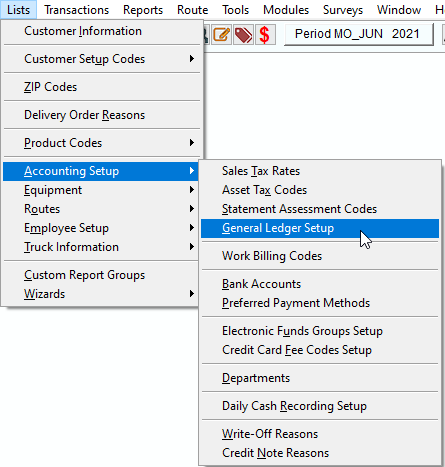
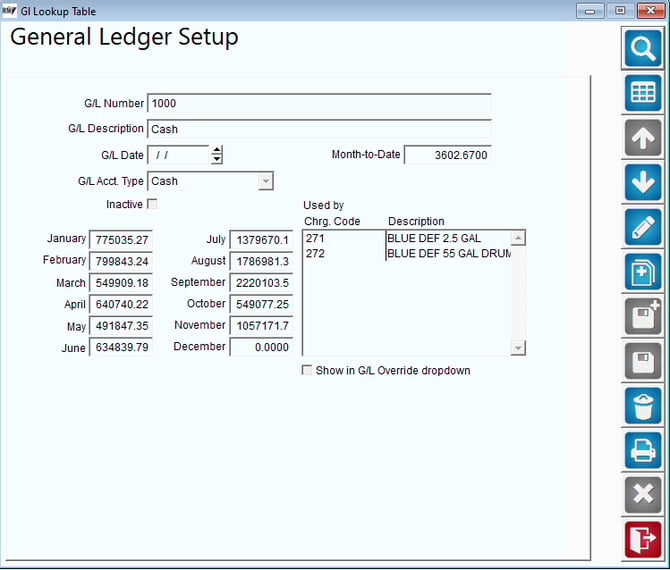
- Cash: Add at least one account that will be used for payments received in RMA.
- Asset: This option is part of a future enhancement in RMA and is not currently being used.
- Accounts Receivable: Add one account which will control all sales in RMA.
- Liability: Add multiple accounts for any long or short-term liabilities (e.g., Sales Tax Payable, Container Deposits).
- Revenue: Add multiple accounts for product sales (e.g., Water Sales, Coffee Sales, Equipment Rent).
- Expense: Add multiple accounts for expenses (e.g., Write-Offs, Refunds).
Inactive: Select to disable the GL Code.