Introduction
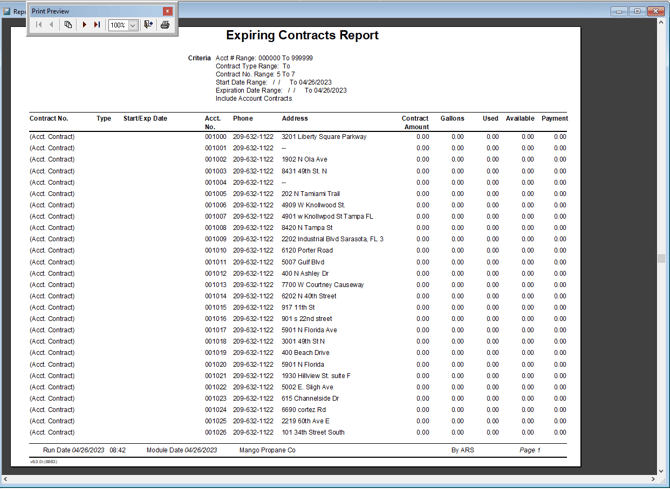
This report will provide you with information related to the contract management system in Route Manager. The Expiring Contracts Report can be found under Reports > Management Reports > Expiring Contracts Report.
NOTE: Route Manager includes contract options that will allow you to create, edit, and manage contract information on your customer’s accounts. This feature can be used in a variety of different ways. Refer to Chapter 4.08 of the Supplemental Guide for further information.
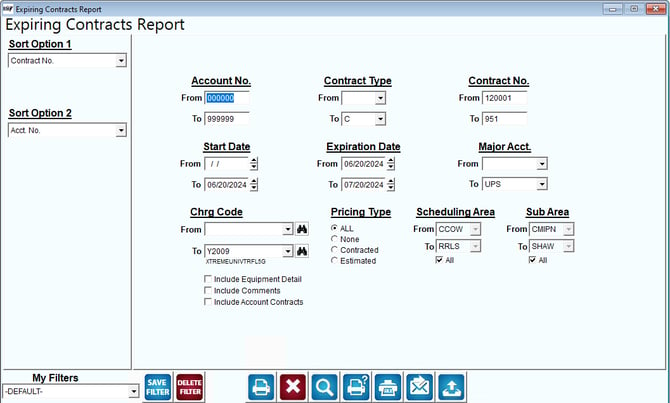
Fields:
Sort Option 1 & 2: The primary and secondary fields to sort by. You can choose from the following categories:
- Contract Number
- Account Number
- Expiration Date
- Contract Type
Account No: Enter the range of accounts to include in the report.
Contract Type: Select the range of contract types to include in the report.
Contract No: Enter the range of contract numbers to include in the report.
Start Date: Enter the range of contract start dates to include in the report.
Expiration Date: Enter the range of contract expiration dates to include in the report.
Include Equipment Detail: Select this option to include contract assigned equipment per customer in the report.
Include Account Contracts: Select this option to include contract information.