
Introduction
"Electronic Truck Interface" (ETI) is a technology system used in commercial trucks, enabling electronic communication between different vehicle components like the engine, transmission, and brakes. ETI systems gather real-time data, monitor vehicle performance, and integrate advanced features such as telematics, remote diagnostics, and fleet communication.
This article will guide you through the essential steps for configuring the necessary setup for your Electronic Truck Interface (ETI) meters.
Setup
Product Class Code
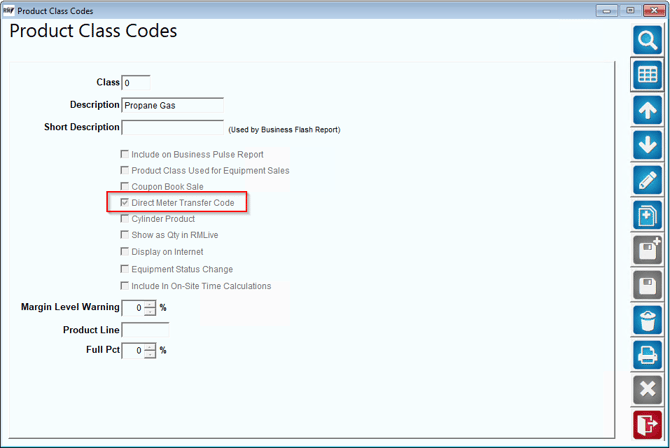
- Product class must be set to ‘Use for Direct Meter Transfer’. Any product charge codes to this product class can now be utilized for ETI pumping.
2. You will assign your product class code to your Propane product charge code on the accounting tab. 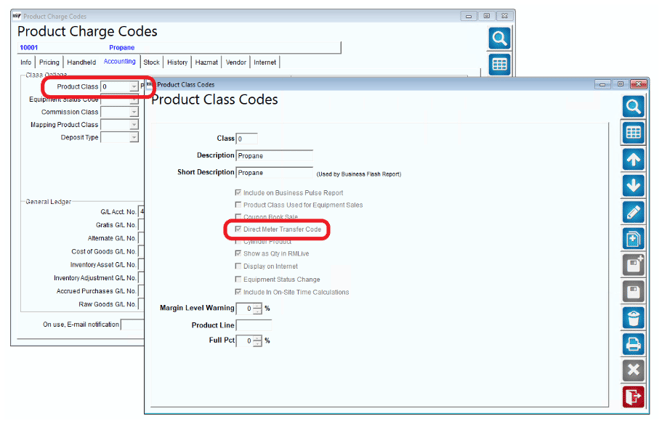
Handheld Class Settings
- In Handheld Settings > Sales Rules 2, you must set the Direct Meter Transfer Type. All other options listed are optional.
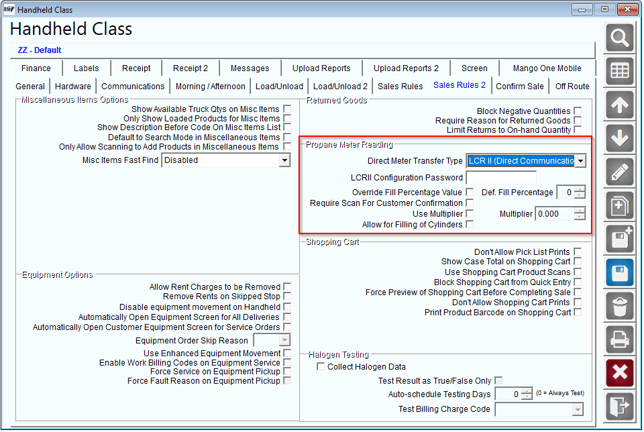
Fields:
Password: Used when the meter is set to Ticket Required – Yes/No.
Override Fill Percentage Value: Enable the option to override the 80% default fill percentage.
Def. Fill Percentage: Adjust the default fill percentage.
Require Scan: Enable this option to require scanning the equipment barcode before allowing the driver to pump to it.
Use Multiplier: Use to add a multiplier to the total gallons pumped.
Multiplier: Use this field to input the multiplier.
Allow for Filling of Cylinders: Enables using the ETI to pump for Cylinder products.
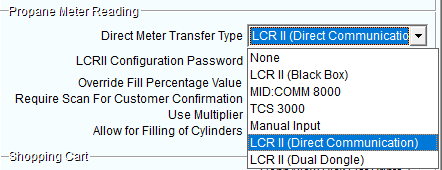
- The most used Transfer Type is LCR II (Direct Communication).
3. After your product class and handheld settings have been configured, you will want to connect the LCR II to your tablet via Bluetooth. How to do this can be found here: https://advantageulibrary.knowledgeowl.com/help/bluetooth-meter-setup
ConclusionThis concludes all of the prerequisites for ETI setup in RMA.