
Overview
The following error can apply to MOM and MM handheld applications:
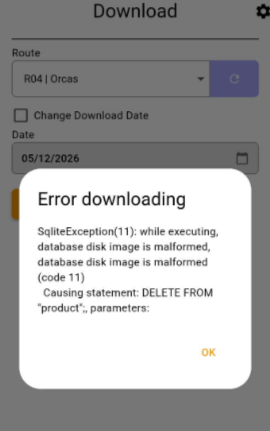
This error typically occurs when the database on the handheld device gets corrupted. Corruption can be caused by multiple different things such as:
- Improper app shutdowns
- Force closing the app
- Battery dying while the app is writing data
- Device reboot during sync/save operations
- Interrupted synchronization
- Wi-Fi drops during upload/download
- Cellular handoff interruptions
- VPN disconnects
- Partial syncs from unstable connections
- Outdated app versions
- Old app communicating with newer server/API versions
- Database schema mismatches after updates
- SQLite corruption
- Incomplete transactions
- App storage reaching limits Bad local cache/database handling
Fix
-
Confirm the device does not have any sensitive data like invoices that need to be saved to the system.
-
If there are invoices that need to be uploaded to RMA, users will need to manually create the invoices in RMA first before clearing the data.
-
-
If you are using an Android device, go to the phone Settings and locate the "Apps" section.
-
Under the apps, open up Mango Mobile or Mango One Mobile (whatever application you are using.)
-
Click on the "Storage" section of the app.
-
Click "Clear Data".
-
Once data is cleared, close out the App window on the phone and reopen.
-
Test download process again.
-
If you are using an iOS device, you cannot clear data on Mango Mobile. You will need to uninstall and then reinstall the application.
-
If you are using an iOS device with MOM, you can go into the MOM application and locate the settings wheel in the top corner.
-
From there, click on the "Database" tab.
-
Click "Clear Data".
-
After clearing data, close out the application window on the phone and re-open the app.
-
Test the download process again.
-