
Mapping all customers who have signed up for Mango Web or Mango Pay can be a valuable feature for better route planning and management. This article will guide you through the steps to enable this functionality in the Mango Mapping settings and generate a map showcasing those customers.
Setup RequirementsBefore generating a map of your Mango Web customers, ensure that you have the necessary setup:
- Mango Mapping Gold or Above: This feature is available only in Mango Mapping Gold or higher versions.
Access Mango Mapping Setup
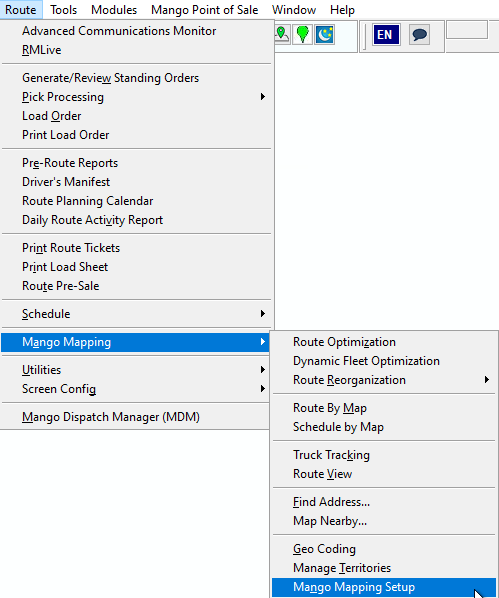
1. To get started, go to Mango Mapping Setup. This can be accessed from either RMA or MDM. Through RMA, navigate to Route > Mango Mapping > Mango Mapping Setup.
Enable Web Locations
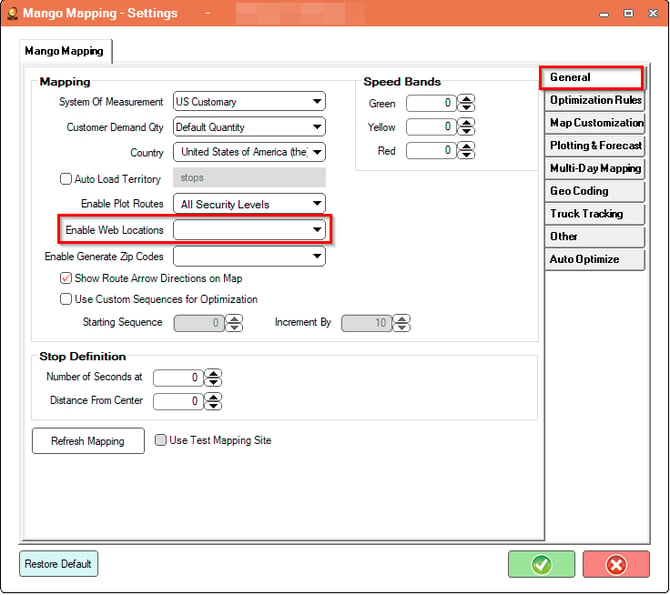
2. In the Mango Mapping Settings window, ensure you are on the General tab.
3. Locate the option labeled Enable Web Locations and select it.
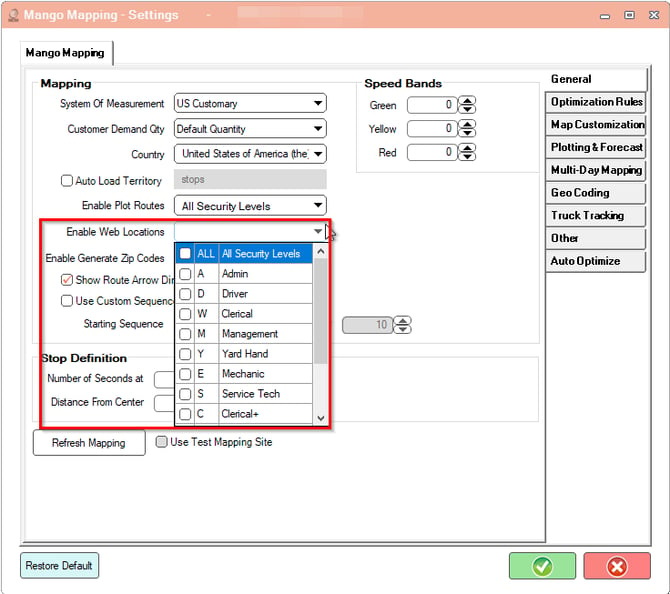
4. A dropdown menu will appear, allowing you to choose which security levels you want to apply this feature to. Select the levels that apply to your needs.
Saving Your Settings
5. Once you have selected the desired Web Locations, click on the green checkmark at the bottom right of the window to save your changes.
SummaryThis function can help you clearly see where your customers are that have signed up for Mango Web or Mango Pay.