Introduction
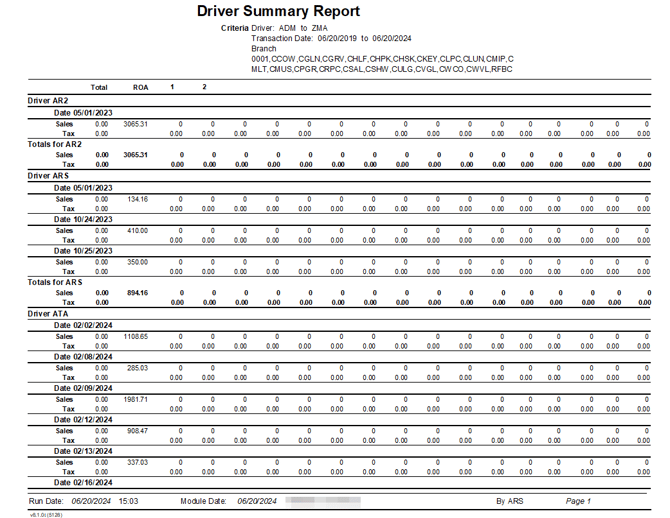
This report includes product sales totals and payment information based on the Commission Class Codes assigned to each product. The Driver Summary Report can be found under Reports > Management Reports > Driver Summary Report.
NOTE: Use the Route Commission Report to view a more traditional commission report that includes totals that should be paid to each employee.
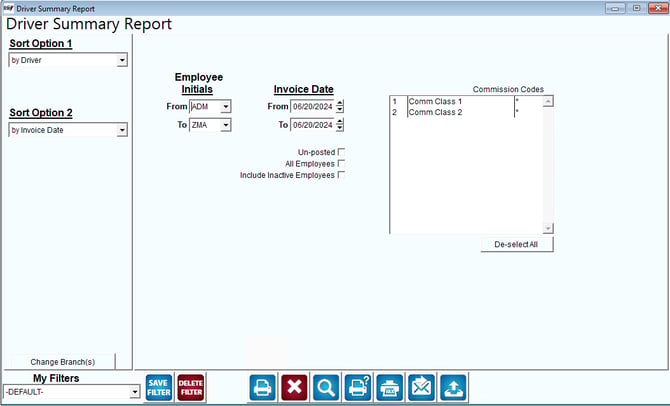
Fields:
Sort Option 1 & 2: The primary and secondary sort options are:
- Driver
- Invoice Date
Change Branch: If you are logged into multiple branches, this option may be shown and allows you to re-select the branches to include in the report instead of having to completely exit the report.
Employee Initials: Select the range of drivers to include in the report.
Invoice Date: Enter the range of invoice dates to include in the report.
Un-posted: Check this box to make this report generate from un-posted transactions.
All Employees: Check this box to include all employees and drivers in the Driver Summary report.
Include Inactive Employees: Check this box to include employees with a Release Date on the report.
Commission Codes: Select the commission codes that you wish to include from the list that appears. If you do not select specific commission codes, the program will include all commission codes in the report.
De-select All: Check this box to restart the selection process.
Here is an example of the report: