
Introduction
The Disputed Invoices option allows you to dispute and resolve invoice problems with customers. To access this, go to Transactions > Payments > Disputed Invoices (Alternatively, simply right-click on an invoice listed within the Open Invoices section of a customer’s account to Dispute or Resolve items).
Disputing an Item:
- Browse for the customer and choose the Modify button.
- Double-click on the invoice to dispute.
- The Disputed field will be populated with the current date, click Save to continue.
Resolving an Item:
- Browse for the customer and choose the Modify button.
- Double-click on a disputed invoice.
- The Resolved field will be populated with the current date, click Save to continue.
Additional Options:
Select the Print button on the screen to access the Disputed Invoices Report. This report can also be found under Reports > Accounting Reports > Sales.
Fields:
Acct No.: Displays the customer’s account number.
Acct Name: Displays the customer’s account name.
Acct Balance: Displays the customer’s account balance.
Date: Displays the invoice date.
Invoice #: Displays the invoice number.
Amt: Displays the original invoice amount.
Open: Displays the remaining open amount due on the invoice.
Disputed: Displays the disputed date of the invoice.
Resolved: Displays the resolved date of the invoice.
Total Amount Open: Displays the sum of all open invoices on the account.
Reporting
Access the report via Reports > Accounting Reports > Sales > Disputed Invoices Report.
This report includes a list of all invoices that are Disputed or Resolved within each customer’s account.
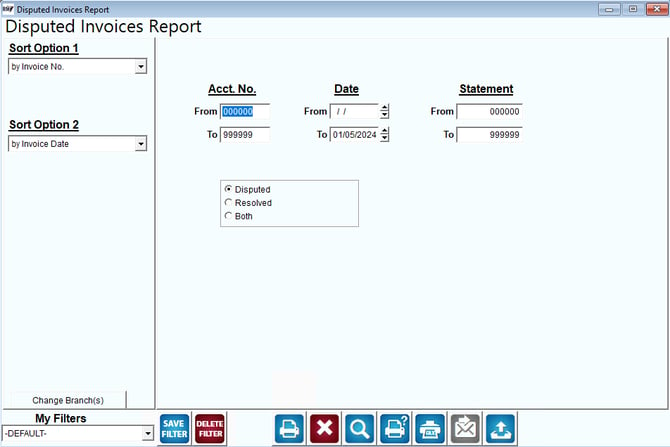
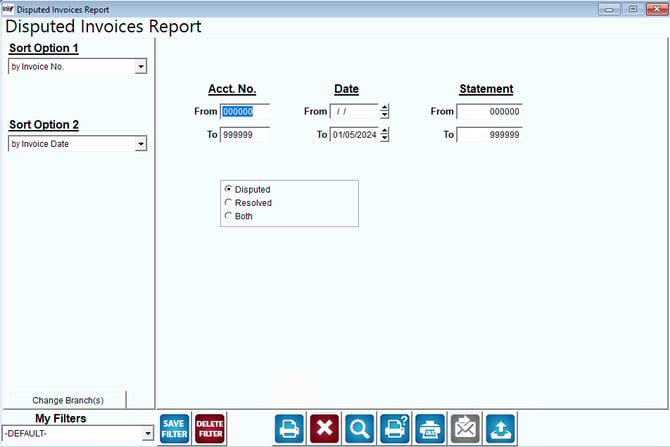
Fields:
Sort Option 1 & 2: The primary and secondary fields to sort by. Select one of the following categories:
- Invoice Number
- Invoice Date
Change Branch: If you are logged into multiple branches, this option may be shown and allows you to re-select the branches to include in the report instead of having to completely exit the report.
Acct No: Enter the range of account numbers to include in this report.
Date: Enter the date range of this report.
Statement: Enter the range of statement numbers to include.
Disputed: Select this option to print disputed invoices.
Resolved: Select this option to print resolved invoices.
Both: Select this option to print disputed and resolved invoices.