
Introduction
This report will give you a list of Delivery Orders entered in the system based on a wide range of criteria options. The Delivery Order Status report can be found under Reports>Route Reports>Daily>Delivery Order Status.
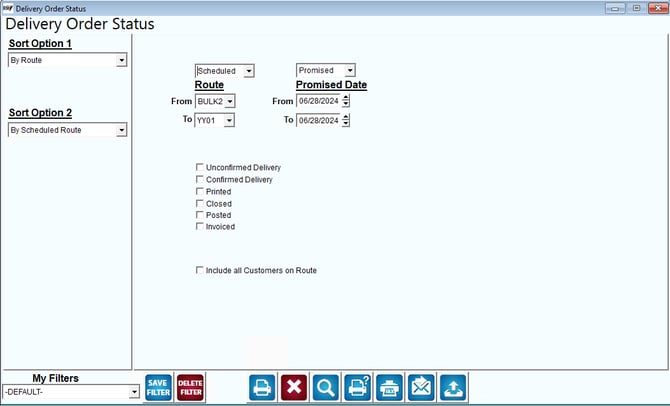
Fields:
Sort Option 1 & 2:The primary and secondary fields to sort by. You can choose from the following categories:
- Route
- Scheduled Route
- Entry Date
- Promised Date
- Acct. No.
Route: Choose between Scheduled Route and Customer Route. Then, enter a range of routes to include in the report.
Promised Date: Choose either Promised Date or Created Date and enter the desired date range.
Unconfirmed Delivery: Choose this option to include Unconfirmed Deliveries on the report.
Confirmed Delivery: Choose this option to include Confirmed Deliveries on the report.
Printed: Choose this option to include printed Delivery Orders on the report.
Closed: Choose this option to include closed Delivery Orders on the report.
Posted: Choose this option to include posted Delivery Orders invoices on the report.
Invoiced: Choose this option to include invoices created for Delivery Orders on the report.
Include all Customers on Route: Choose this option to include all customers with Delivery Orders based on the criteria entered.