
Introduction
This report includes information related to advanced pricing assigned to each customer.
Advanced Pricing by Customer Report
The Advanced Pricing by Customer report can be found under Reports>Accounting Reports>Customer> Advanced Pricing by Customer.
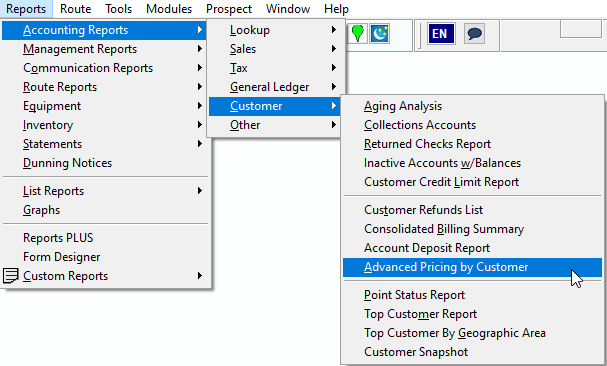
Note: This was formerly known as Default Products by Customer in RMA V7.
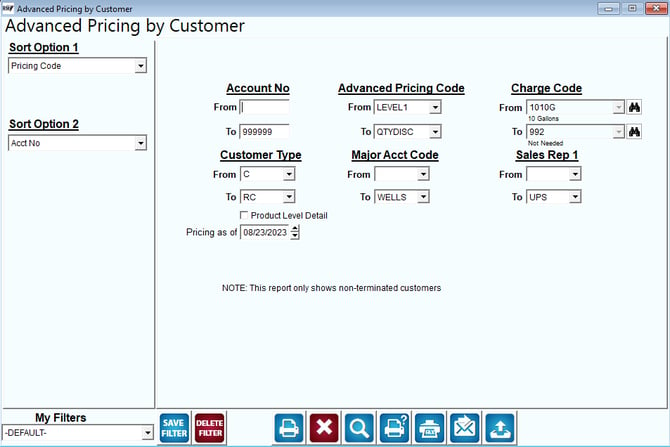
Fields:
Sort Option 1 & 2: The primary and secondary fields to sort by. You can choose from the following categories:
- Pricing Code
- Account Number
Account No.: Enter the range of accounts to include on the report.
Charge Code: Select the range of Charge Codes to include on this report.
Customer Type: The range of customer types to include on this report.
Major Acct Code: Select the rand of major account codes to include in the report.
Sales Rep 1: Select the range of sales rep 1 to include in the report.
Product Level Detail: Select this to show product details for all selected customers.
Pricing as of: Select a specific start date to show pricing from (Used with the Default Products promotional date range.)