
Introduction
The Daily Sales Report allows you to print a sales report for a selected date. The report contains summarized posted totals for the date listed. Navigate to Reports > Accounting Reports > Sales > Daily Sales Report.
NOTE: If multiple postings were done on the same date, the report will include a combined total for the date selected.
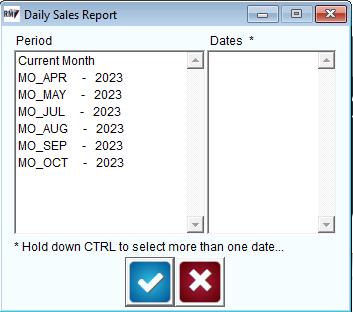
After selecting the desired day(s), click ‘OK’.
Customer Sales by Product Class
The Customer Sales by Product Class Report includes product sales information separated by Product Class per customer. The report includes individual columns for each Product Class and a total sales summary. Navigate to Reports > Accounting Reports > Sales > Customer Sales by Product Class.
NOTE: This report can only be viewed within Microsoft Excel.
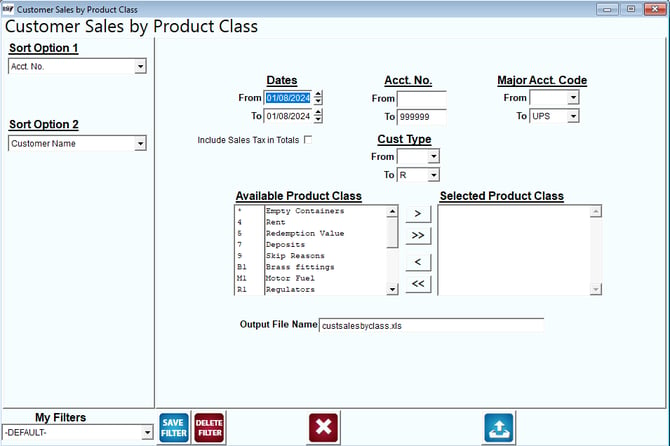
Fields:
Sort Option 1 & 2: The primary fields to sort by. You can choose from the following categories:
- Account Number
- Customer Name
- Highest Balance
Dates: Select the range of dates to include in the report.
Acct No: Enter the range of account numbers to include in the report.
Major Acct Code: Select the range of Major Account Codes to include in the report.
Cust Type: Select the range of Customer Types to include in the report.
Include Sales Tax in Totals: Select this option to include Sales Tax Totals on the report.
Available Product Class: Includes all of the available Product Classes that can be added to the report.
Selected Product Class: Includes all of the Product Classes that will be included in the report.
NOTE: Use the arrows or double-click on each Product Class to add or remove from the list.
Output File Name: Specify the file name that you would like to assign to the report.