
Introduction
The Daily Route Activity Report is used as a summary to see when each route has been uploaded and/or downloaded and the # of stops on that route. To access the Daily Route Activity Report, go to Route > Daily Route Activity Report.
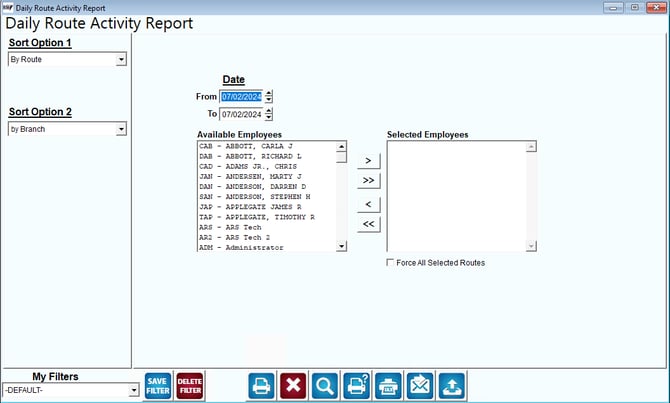
Fields:
Sort Option 1 & 2: The primary and secondary fields to sort by. You can sort from the following categories:
- Route
- Branch
Date: Select the Route Date to be used for the Report.
Available Employees: This is a list of available employees that can be included in the report
Selected Employees: This is a list of selected employees to be included on the report.
 Click this button to move the selected employee from the list of Available Employees to Selected Employees.
 Click this button to move all of the employees in Available Employees to Selected Employees.
 Click this button to move the selected employee from Selected Employees to Available Employees.
 Click this button to move all of the employees in Selected Employees to Available Employees.
Force All Selected Routes: Select this option to print ALL route activities for the selected route, regardless of Route Date.