
Introduction
The Customer Snapshot Report will calculate average rent price as well as list all customers and details about them: EQ Install date, Last Delivery, if they are terminated and/or past due and their To Date Revenue.
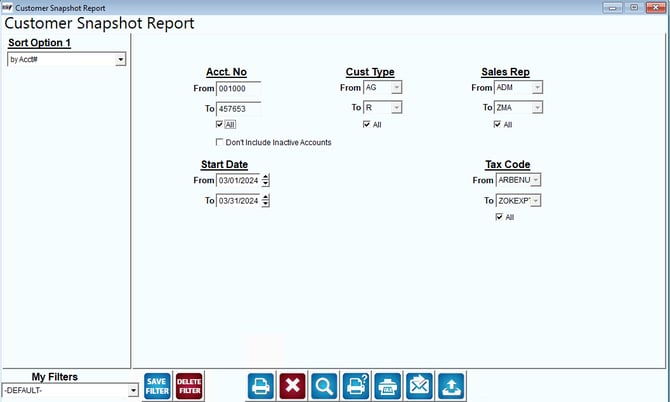
Fields:
Sort Option 1: The primary fields to sort by. You can choose from the following categories:
- Account Number
- Start Date
- Sales Rep
Acct No: Enter the range of accounts to include in the report.
All: Select this option to show All accounts on report.
Don’t Include Inactive Accounts: Select this option to not include inactive accounts on the report.
Cust Type: Select the range of customer types to include in the report.
All: Select this option to show All Customer Types on report.
Sales Rep: Select the range of sales reps to include in the report.
All: Select this option to show All Sales Reps on report.
Start Date From-To: The range of start dates to include in the report.
Tax Code From-To: The range of tax codes to include in the report.
All: Select this option to show all tax codes on the report.