
Introduction
This report prints a list of all customers with installed equipment. The Customer Equipment List report can be found under Reports > Route Reports > Management > Customer Equipment List.
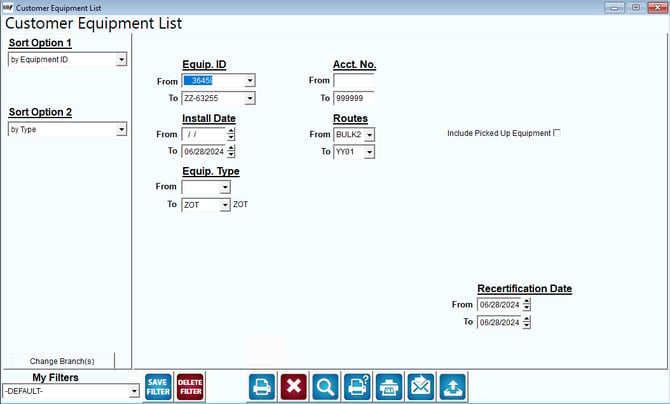
Fields:
Sort Option 1 & 2: The primary and secondary fields to sort by. You can choose to sort by:
- Equipment ID
- Equipment Type
- Account Number
- Rent Billing Frequency
- Customer Owner Flag
- Purchase Date
- Purchase Vendor
- Install Date
- Route
Change Branch: If you are logged into multiple branches, this option may be shown and allows you to re-select the branches to include in the report instead of having to completely exit the report.
Equip. ID: The range of serial numbers to include in the report.
Acct No: The range of accounts to include in the report.
Install Date: The date range of equipment installation.
Routes: The route range to include in the report.
Include Picked Up Equipment: Indicate whether to include your customer’s equipment that has been picked up.
Equip. Type: The range of equipment types to include in the report.