
Introduction
This report identifies customers that have exceeded their assigned credit limit. The Customer Credit Limit Report can be found under Reports > Accounting Reports > Customer > Customer Credit Limit Report.
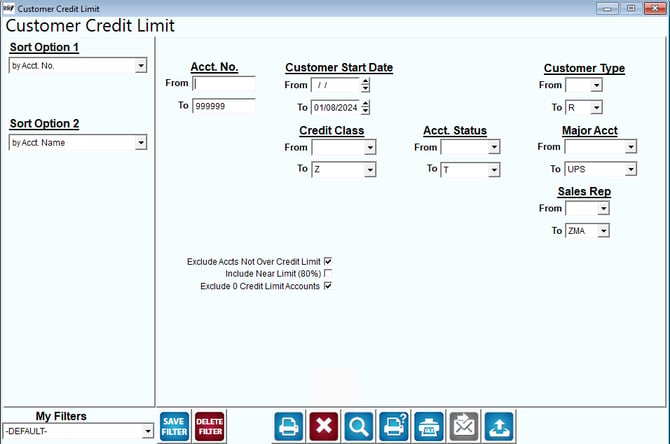
Fields:
Sort Option 1 & 2: The primary and secondary fields to sort by. You can choose from the following categories:
- Account Number
- Name
- Credit Limit
Acct No: Enter the range of accounts to include in the report.
Customer Start Date: Select the range of customer start dates to include in the report.
Customer Type: Select the range of customer types to include in the report.
Credit Class: Select the range of credit classes to include in the report.
Acct Status: Select the range of account status to include in the report.
Major Acct: Select the range of major account codes to include in the report.
Exclude Accounts Not Over Credit Limit: Select this option to view only customers that have exceeded their allotted credit limit.
Include Near Limit (80%): Select this option to include customers that have used at least 80% of their allotted credit limit.
Exclude 0 Credit Limit Accounts: Select this option to exclude customers that do not have an assigned credit limit (e.g., 0.00).
Sales Rep: Select the range of sales reps to include in the report.