
Introduction
Use this report to display ‘credit’ and ‘write-off’ invoices posted to each customer’s account. The Credit/Write-Off Invoices report can be found under Reports > Accounting Reports > Other > Credit/Write-Off Invoices.
NOTE: Credit Note and Write-Off Reasons are found under Lists > Accounting Setup. These codes can be assigned to invoices from within the Customer Finance Assistant.
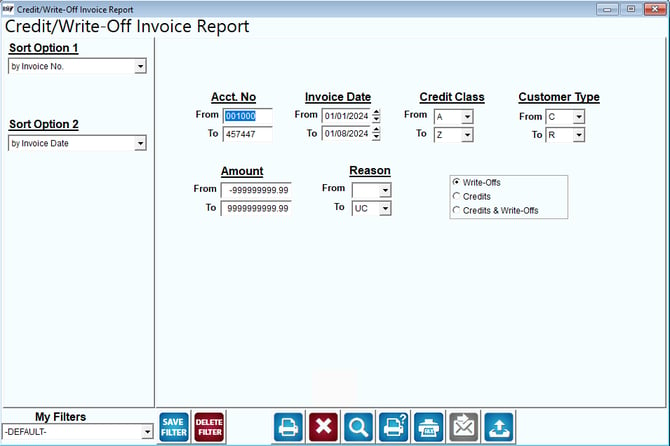
Fields:
Sort Option 1 & 2: The primary and secondary fields to sort by. You can choose from the following categories:
- Invoice Number
- Invoice Date
Acct No: Enter the range of customers to include in this report.
Invoice Date: Enter the range of invoice dates to include in this report.
Credit Class: Select the range of credit classes to include in this report.
Customer Type: Select the range of customer types to include in this report.
Amount: Enter the invoice amounts to include in this report.
Reason: Select the range of ‘write-off reasons’ to include in the report.
Write-Offs: Include only write-offs on the report.
Credits: Include only credits on the report.
Credits & Write-Offs: Include both credits and write-offs on the report.