
Introduction
A Business Flash Report is a type of report that provides a quick overview or snapshot of the key performance indicators and metrics of a business. These reports are designed to give managers and executives up-to-date information to make informed decisions without having to dig through detailed data. Typically, they include financial data, sales figures, operational metrics, and other relevant business information.
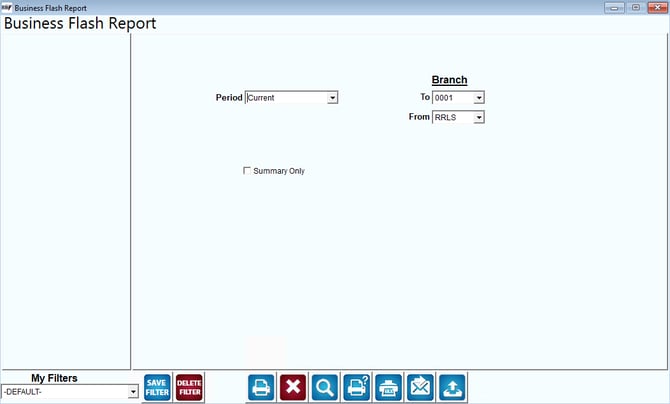
Fields:
Period: The dropdown labeled "Period" allows the user to select the time frame for which they want to view the report. Options might include "Current," "Previous," "Year-to-Date," etc.
Branch: To / From: These dropdowns allow users to specify the branch or location of the business they want to include in the report. This can be useful for businesses with multiple branches or locations, allowing them to focus on specific areas.
Summary Only: This checkbox might provide an option to generate a condensed version of the report that highlights only the key figures, omitting more detailed data.
My Filters: This section allows users to apply custom filters to the report. The dropdown shows the current filter being used, which is “-DEFAULT-”. Users can save or delete filters using the "SAVE FILTER" and "DELETE FILTER" buttons, respectively.
Action Buttons:
The buttons at the bottom likely perform different functions, such as:
- SAVE FILTER: Saves the current filter settings for future use.
- DELETE FILTER: Deletes the selected filter.
- Print, Export, and Other Functions: The icons at the bottom suggest functionality like printing the report, exporting it to a file, accessing help, sending via fax, or resetting/clearing the form.